The topographic sciences are a math intensive endeavor. Map making is far more than drawing squiggly lines on a sheet of paper. Before those squiggly lines get drawn there first must be a determination of things like the geographic extent of the map, the scale, the coordinate system and projection and the precise location of key features on the map. This all has to be figured out before the first line is drawn. This means number crunching, lots and lots of number crunching. A competent topographer needed to be conversant in everything from plane geometry to matrix algebra to calculus.
Today all of the complex math involved in map making is easily and swiftly handled by computers. A mouse click or two in a multi-threaded 64-bit desktop application launches a routine that returns a mathematical solution in seconds. But just 60 years ago the same routine would take a competent topographer or mathematician hours to calculate by hand and would involve the use of special forms, books full of mathematical tables, slide rules and, if he or she was lucky, a hand cranked mechanical calculating machine that might be able to hold precision to a decimal place or two.
There was a time not long ago that the accuracy of these calculations was so important that the job of ‘calculator’ was something that a young man or woman with good math skills could make a decent living at. For example, in the US Geological Survey (USGS) the topographic or geodetic survey crews would collect the data in the field and do some initial accuracy checks just to make sure they hadn’t ‘busted’, or obviously exceeded the required accuracy for the type of survey the were conducting. All the data would then be sent to a USGS field office or headquarters where the specially trained ‘calculators’ would re-evaluate the data to provide a final approved result.
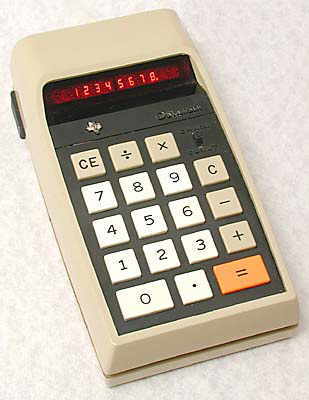
About 40 years ago there was a paradigm shift in the topographic field that was brought about by the introduction of (relatively) inexpensive handheld calculators. It’s hard for those who didn’t live through this time to understand just how big of an impact the handheld electronic calculator had on the scientific and engineering world, and this included the topographic sciences. My father was (and still is!) a chemical engineer, and I remember watching him sit at the table after dinner grinding through stacks of engineering calculations with a slide rule and long calculation sheets. One day in the mid-1970’s he went out to the local J.C. Penneys and came home with a new device that fundamentally changed how he worked – a simple ‘4-banger’ Texas Instruments calculator, probably the TI-2500 ‘Datamath’ model. All it did was add, subtract, multiply and divide (hence the ‘4-banger’ designation) and at $119 dollars (equivalent to $575 today) it was a significant investment, but the improvement in accuracy and speed of calculations made the investment worthwhile.

Texas Instruments TI-2500
From there things only got better. While desktop computers were still just pie-in-the-sky devices we saw on the weekly episodes of Star Trek, handheld calculators quickly started dropping in price while adding newer and more advanced features. Faster and cheaper processors, better displays, better batteries, storage registers (i.e., memory), statistical functions, angular calculations, exponent calculations, continuous memory, programming, symbolic equations, alpha-numeric registers, unit conversions and a lot more. By the time I started college in early 1975 I could pick up a feature rich Texas Instruments scientific calculator like the SR-50 for a little over $50. This calculator offered all the capabilities a financially and academically struggling student needed for most of his college career.
In the early 1970’s a new player emerged onto the calculator scene. Hewlett-Packard (HP) was a highly regarded electronic test equipment and computer manufacturer that had released some very successful desktop calculators and mini-computers in the late 60’s and early 70’s. One of the company’s founders, Bill Hewlett, was watching the emerging calculator market and challenged his engineers to come up with a calculator designed specifically for scientists and engineers that would fit into his shirt pocket. Even though HP’s marketing group didn’t think it would sell, Bill pushed the project forward and in 1972 HP released the HP-35. It took the scientific and engineering world by storm. The marketing gurus said HP would never sell more than 10,000 units, total. In the first year alone HP sold over 100,000 and when production of the HP-35 ended in 1975 it had sold over 300,000. That’s pretty impressive sales numbers for a calculator that cost over $2,000 in today’s dollars!
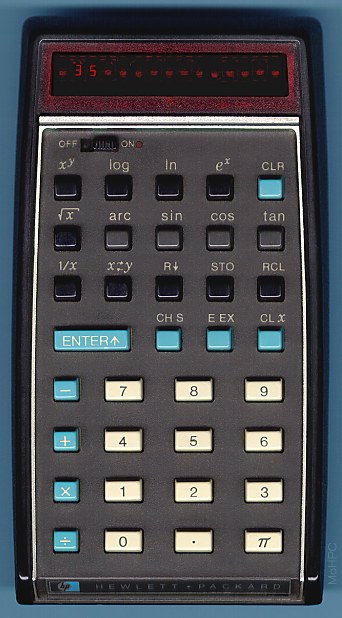
The HP-35 Scientific Calculator
The HP-35 set the standard for all HP calculators that followed. Rugged construction, high reliability, excellent documentation and support, well implemented features and the unusual but very efficient computational system known as Reverse Polish Notation (RPN).
As a young college student I was well aware of HP’s offerings. The calculators were offered for sale in the college bookstore where I was studying and HP ads were appearing in a lot of the magazines I regularly read (like Scientific American). In addition, HP would ship you large envelopes stuffed full of promotional material and copies of the company’s magazine devoted specifically to it’s calculators and their use. At the time my brother worked at a test lab in Toledo, Ohio and would bring home one of the early HP-21’s that the lab owned just to play with. I was hooked, but there was no way a poor college kid was going to be able to afford a calculator that cost at least four times what my Texas Instruments calculator had cost me.
Fast forward a few years to 1982 and I’m out of college, in the Army Corps of Engineers and reporting to the Defense Mapping School at Fort Belvoir, Virginia, to attend the Mapping, Charting and Geodesy Officer’s Course (MC&GOC). On the first day the course leader handed each of us an HP-31 calculator and gave us a fast course in Reverse Polish Notation and stack manipulation. Then it was off to the races, with the first part of the course covering survey theory, statistics, matrix algebra and least squares. Since the Army was paying me a little extra each week to attend the class I figured it was time for me to buy my own HP calculator. One Saturday morning I took the Metro to an office supply store in downtown DC and bought myself a brand spanking new HP-32E.
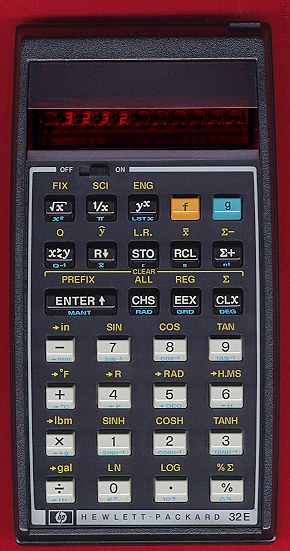
HP-32E
That purchase triggered several decades of HP calculator accumulation. I can’t claim that I ‘collect’ HP calculators since I rarely go looking for them. However, if one happens to fall into my lap – usually from a co-worker looking to get rid of an old unit or I stumble on one in a pawn shop or at a yard sale – I’ll pick it up and add it to my stash.
I’m sure some of you are asking yourselves, “But does he still use any of those calculators?” You bet! While high end GIS software and spreadsheet programs have taken over most of the heavy number crunching I do, I still keep a modern HP 35S, on my desk for those ‘right now’ calculation needs that crop up almost daily. In addition I run HP calculator emulators on my iPhone and Android devices that have proven themselves very useful when in meetings and someone needs quick averages run on a series of numbers, or some quick sums done, or a rough comparison between estimates calculated. The handheld calculator is still a very useful tool!
Let’s take a look at a few calculators in my collection and discuss their significance:

Texas Instruments TI-59
This is one of the few non-HP calculators in my collection, but it’s here for two reasons. First, this particular calculator used to belong to my father, who used it in the latter stages of his professional career.
The other reason I include it is because it represents an interesting example of how technology advances regardless of what the powers-that-be want. In the early 1980s I was attending the Air Load Planners School at Fort Bragg, where we learned to do aircraft load and balance configurations for our unit’s wheeled and tracked equipment. A couple of my classmates were out of the Field Artillery battalions on Fort Bragg and all were using TI-58 or 59 calculators. During a break one day I asked them where all the TI calculators came from. They told me that the calculators actually belonged to their units and were used as unofficial (and unapproved) replacements for the big, bulky FADAC computers the Field Artillery units used to calculate indirect artillery fire. The FADAC was 1960’s technology that took up an entire table, required a 10 kilowatt generator to power and cranked out enough heat to fry an egg. In the early 1980’s some sharp young lieutenants at the Field Artillery School figured out that all the computations the FADAC system did could be easily handled by the TI-59. Since the TI-59 was one of the earliest magnetic strip programmable calculators it was easy to copy all the calculation routines to the strips and share them around. Local Field Artillery units snuck out and locally purchased TI-59 calculators and began using them in place of the FADAC systems. This was particularly advantageous for light artillery units in the 82nd and 101st Airborne Divisions since they could carry ‘FADAC-lite’ capability in their rucksacks.
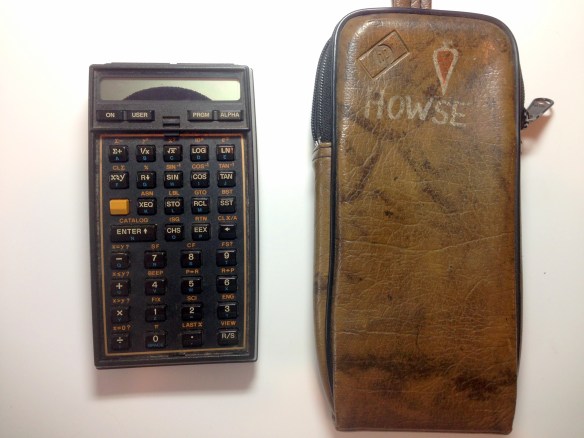
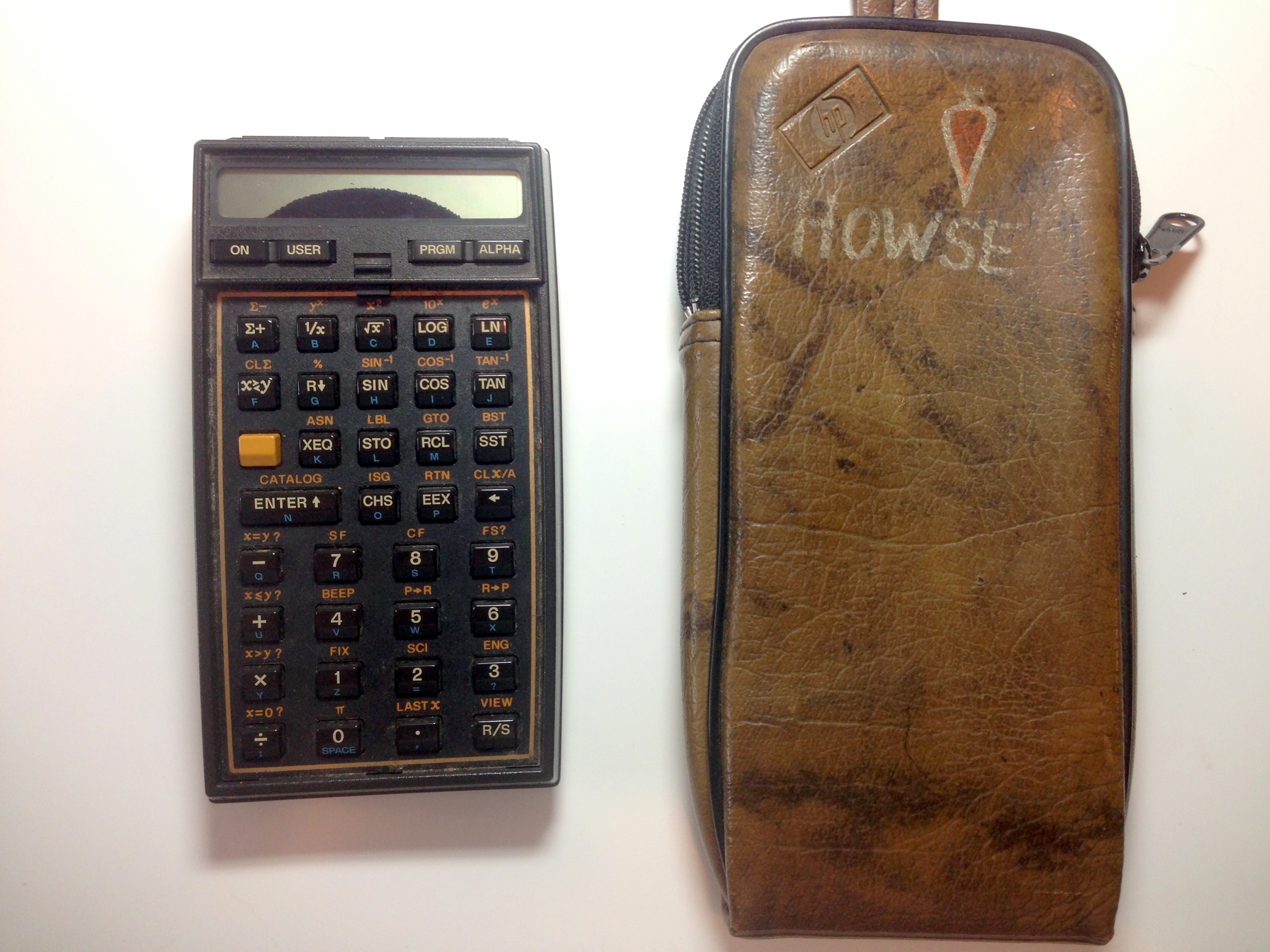
HP-41CV
The HP-41 calculator was out of this world – literally. More on that in just a bit.
When HP introduced the HP-41 in 1979 it appeared to make all previous HP models obsolete. Not entirely true, but that’s the impression it gave. A lot of engineers and scientists chucked their old calculators, took out loans and bought themselves an HP-41 and accessories. Many of those calculators are still chugging along and their owners refuse to let go of them or move up to something more advanced. What made the HP-41 so good? It wasn’t HP’s first programmable calculator, or its first with continuous memory. What made the HP-41 special was that it was the first handheld calculator with an expansion interface. When you bought the HP-41 you were buying just one component of a larger system that could include dedicated expansion modules for things like surveying, electrical engineering, structural analysis or celestial navigation. You could hook it up to a floppy disk drive to write or retrieve data. You could attach a bar code reader or send your work to a printer via an infrared link. You could hook it up to sensors to monitor temperature, humidity, blood pressure, and lots more. The HP-41 was also HP’s first calculator that used an LCD display, greatly reducing battery drain, and it introduced the idea of alpha-numeric tags for programming. In short, the HP-41 was more computer than calculator.
The HP-41 caught on strong with the surveying community and a lot of third party surveying applications were developed for it. Many of these calculators went to the field with survey crews and computations were run on the spot to verify collected data. The HP-41 provided the first glimpse into the future, where theodolites and computers would become integrated systems and all data collection and reduction was done on the instrument in real time.
This particular calculator obviously doesn’t work, and it’s damaged beyond repair. I picked it up in my unit in Germany back in 1998. We were doing a final clean-out of unserviceable equipment left behind from the inactivation of the 649th Engineer Battalion (Topographic) and I found this calculator in a box that was headed for the dumpster. I saved it only because it had someone’s name on the case and because I didn’t have an example of an HP-41 in my collection, working or not. So, Surveyor Howse, if you want your HP-41 back just drop me a line. I’ll be happy to return it!
Now, what about the ‘out of this world’ comment? Well, in 1980 NASA went looking for a programmable calculator that could be carried by the astronauts on the first Space Shuttle flight. The idea was to program the calculators with critical flight data and routines for the astronauts to use in case Columbia’s on-board systems failed. Each of the two pilots, John Young and Robert Crippen, carried HP-41s in their flight suit pockets. This made the HP-41 the first handheld calculator in space. Thankfully the pilots didn’t need the calculators for their intended purpose, but HP-41s flew on a number of subsequent flights, mainly as auxiliary computers to help take the computational loads off of the Space Shuttle’s overburdened computers. One of these HP-41s, used by Astronaut Sally Ride, is on display at the National Air and Space Museum.

HP-34C
The HP-34C is perhaps the best example of HP’s third generation of handheld calculators, and in its time was considered HP’s high end keystroke programmable calculator. None of the third generation calculators offered card reader capability like the HP-41 or HP-67, but with continuous memory capability you could key in a wide variety of short programs and run them as needed. This calculator also sports what is considered the classic HP calculator key layout, and it’s a layout that is still praised today for it’s clarity and ease of use.

HP-11C
The HP-10 series of calculators came out in 1981 and included the 10C, 11C, 12C, 15C and 16C. Of this group the 11C and 15C Advanced Scientific calculators were by far the most popular, and the 11C remained one of HP’s best selling calculators for years. In my office there are still civil engineers with old, battered, but functioning 11C or 15C calculators on their desks.
Both of these calculators are 11C models. The one on the bottom with the missing HP sticker has an interesting history. This is the second HP calculator I bought for myself, back around 1983 (not long after buying my HP-32E). I decided I just couldn’t live without continuous memory. This calculator was carried daily, usually in the cargo pocket of my Army BDU uniform. One day I came home from work and my lovely wife met me at the door holding a wet pair of BDU trousers that she had just pulled out of the clothes washer. She looked at me and growled, “It ain’t my fault!” and tossed me the trousers. I knew right away she was referring to something I had left in the pockets but didn’t know what. As I squeezed the various pockets I immediately felt the outline of my 11C and knew I was in trouble. I pulled the calculator out and was disappointed, but not surprised, to see it wouldn’t turn on. I figured I had nothing to lose by trying to resuscitate it, so I pulled out the batteries, wiped it down as best I could and put it in a nice dry location. A few weeks later I popped in a new set of batteries and hit the ‘ON’ button. To my amazement it came to life! I ran through all the built-in diagnostic utilities and it returned no errors. The calculator returned to work with me the next day.
Somewhere along the way this calculator went missing. At the time we were living in Frankfurt, Germany so I went down to the big Herite department store on the Hauptwache and purchased a new one (complete with German documentation). That calculator (the one on the top in the picture) is still running on the original set of batteries I installed in 1985! About a year later I was going through some old papers from work and was surprised to find my old, original 11C stuffed into a manila folder full of forms. It must have gotten accidentally dropped into the folder without me noticing it. So now I have two 11C’s, and both work like champs!
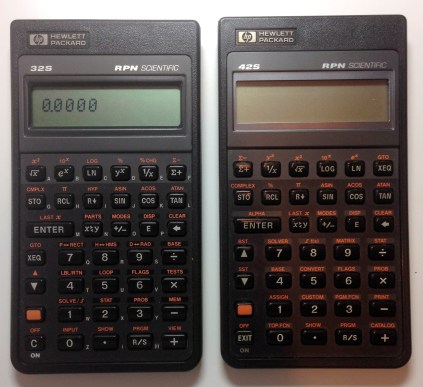
HP-32S (left), HP-42S (right)
This series of HP calculators was introduced in 1986 and was intended to replace the 10-series discussed above. Mostly they succeeded. The HP-32S remained in production for over 10 years and was actually quite a good yoeman scientific calculator. Nothing spectacular, just a very reliable, rugged calculator loaded with useful features. Its dot matrix display made it a bit hard to read in some lighting conditions, but it made better use of the built-in alpha-numeric register options.
The HP-42S is an interesting product. In 1988 the venerable HP-41 was reaching the end of its product life cycle and HP had plans to phase it out in favor of the new HP-48 series of graphing calculators. Yet HP knew that the HP-41 series had a strong, almost cult-like following and that HP-41 users would be reluctant to abandon their existing applications and programs. In an effort to bridge the gap between the HP-41 and the newer HP-48, Hewlet Packard introduced the HP-42S. Basically they ported the HP-41 ROM over to this new format and incorporated some improvements – faster processor, better display, more storage registers and a few other upgrades like a matrix editor. At first the user community took it as a joke – an HP-41 ‘compliant’ operating system on a calculator that offered no input other than keystroke programming and no output other than an infrared link to a printer. Sales were slow, and while HP kept it in production for about 7 years it never really sold well. Can you tell where this is going? Now, more than 20 years after its introduction the HP-42S is a hot collectors item. HP aficionados now recognize it as something special – a ‘hot-rodded’ version of their beloved HP-41 in a smaller and easier to use package.

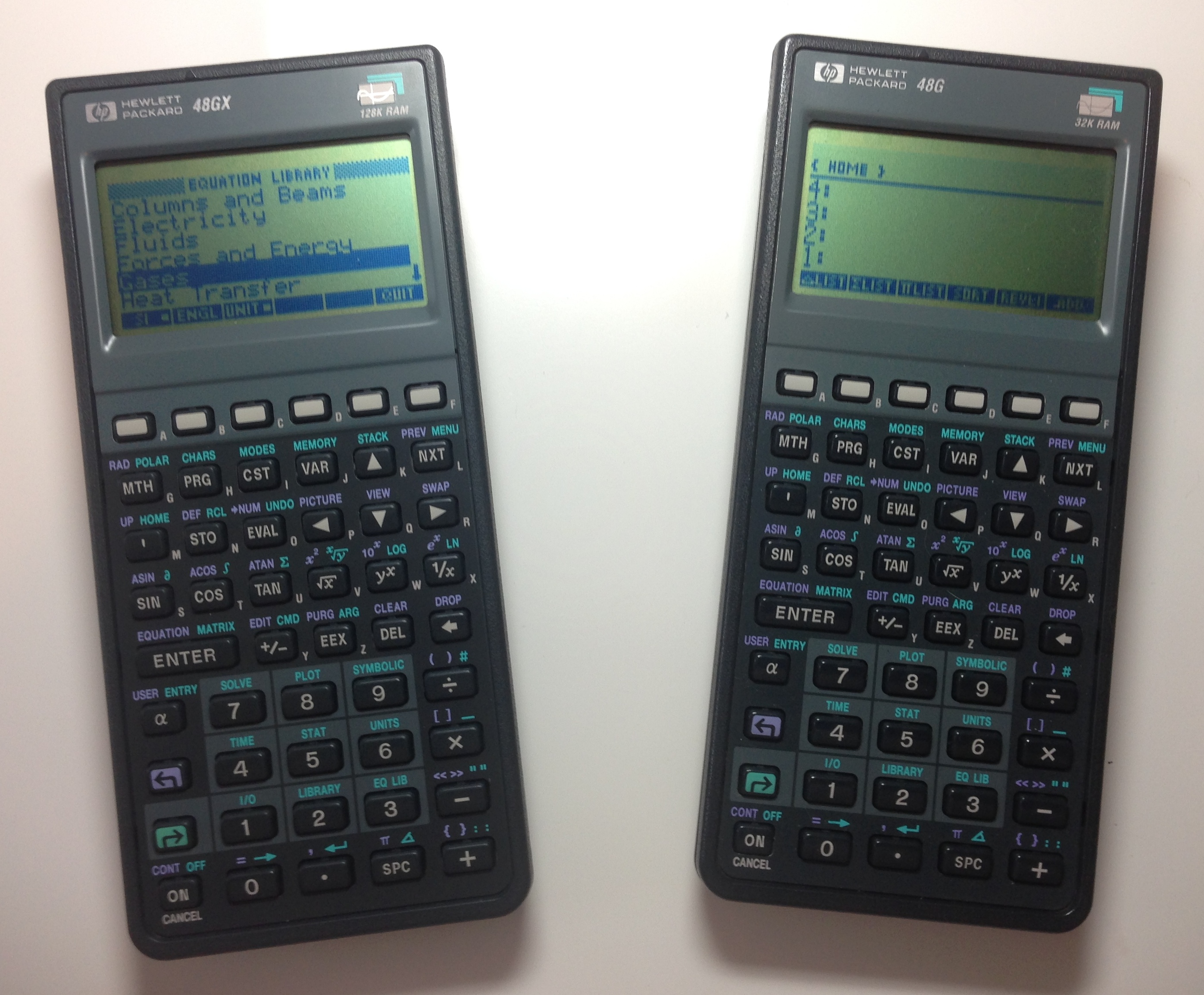
HP-48G Series
Let’s wrap this up with a look at what many (including me) consider to be the last of the classic HP calculators. The HP-48 was developed to replace the HP-41 series, and fully succeeded in that goal. While the HP-48’s never developed the devoted following the HP-41 series did, the HP-48 succeeded on another level – they became solid and serious workhorse calculators that found their way into a wide range of applications. They were well built, feature rich, expandable, offered great battery life (using commonly available AAA batteries) and excellent connectivity with a wide variety of devices via a standard serial cable. Survey program developers quickly took advantage of the HP-48’s power and capabilities and wrote software that turned the units into data collectors that hooked right up to early digital theodolites, making the HP-48 one of the first dedicated data collectors on the market. The calculator shipped with its own application library installed, but developers wrote hundreds of additional applications covering a wide range of subjects such as biodiversity evaluation and commercial aviation fuel load calculations. One of the HP 48’s in my collection was surplussed out of the University of Michigan Dept. of Physiology where it was used as a human bio-metric data controller. The HP-48 stayed in production for 13 years making it one of the most successful lines of calculators produced by any manufacturer. Today there are thousands still in use around the world and, like the HP-41 a generation earlier, their users refuse to let go of them.
Sadly, after the HP-48 Hewlett-Packard all but abandoned the calculator market. HP management and marketing folks didn’t see any future for handheld calculators and let the calculator unit wither on the vine. Calculator development was moved off-shore and HP’s offerings became little more than bland re-badged products produced in China. For a time HP even toyed with abandoning its signature RPN operating system in an effort to capture a share of the student calculator market dominated by Texas Instruments.
HP’s interest in calculators seemed to perk up a bit as the 35th anniversary of the HP-35 approached. In 2007 they introduced the HP-35S, a design that received a lot of input from classic HP calculator aficionados. It was a good effort that hearkened back to the classic HP calculator designs of the 1980s and runs a faithful implementation of HP’s classic RPN operating system. Since then not much has happened. Two years ago HP released a new product called the HP Prime, a high end graphing calculator that gets very good reviews, but today HP’s serious scientific calculator offerings can be tallied on the fingers of one hand.
Let’s hope we are not seeing the end of a long and storied calculator dynasty.
– Brian






 Northing & Easting