Busting Brush with ArcGIS for Windows Mobile

Huh?  What?

OK, at work we are testing a new software package – ArcGIS for Windows Mobile.  The name is a mashup of two software package names – ArcGIS (ESRI) and Windows Mobile (Microsoft).  Yes, it is a cumbersome name.  Really, really cumbersome.

It is nothing more than a lite version of ESRI’s ArcGIS software designed specifically to run on the Windows Mobile OS.  Never heard of Windows Mobile?  Don’t worry, you haven’t missed much.  It’s an operating system that saw its widest use on mobile phones.  Notice I didn’t say ‘smart’ phones, because Windows Mobile was (and still is) an awful operating system that made every piece of hardware it touched dumber.  Same for its users.  I’m sure when Steve Jobs was yelling at his software engineers during the early stages of Apple’s iOS development he forced them to use Windows Mobile phones so they clearly understood what  iOS would not end up looking like.

Microsoft has moved on and introduced their new Windows Phone OS that is based on the Windows 8 platform.  However, their Windows Mobile OS hangs on in a few interesting places.  It’s used a lot in ’embedded’ applications, computers running inside of other things that don’t look like computers.  For example, the Microsoft Sync system that controls just about everything in my new Ford F-150 is a version of Windows Mobile.

Another place Windows Mobile has achieved a lot of market penetration is in the surveying and GPS-based data collection market.  These are highly customized hardware systems that are more than mobile phones but less that full-fledged computers, robust devices dedicated to a narrow set of field data collection tasks.  Virtually all manufacturers of surveying and GPS-based field data collection systems use Windows Mobile – there’s really nothing else available today that meets the need.

Two of the devices in this picture run on Windows Mobile.
The rest are easy to use.

Because of this ESRI still develops a lot of software to run on the Windows Mobile OS (now up to version 6.5 and renamed Windows Embedded Handheld).  ArcPad, ESRI’s flagship field data collection package, has been running on the Windows Mobile platform for almost a decade.  A few years back ESRI released a version of its server software (called, naturally, ArcGIS for Server) that allowed the user to develop GIS applications that run on Windows Mobile handhelds and consume map services hosted on a local ArcGIS for Server instance.  We tested this at work but came away with the impression that the whole system required more care and feeding than we were able to provide.  In addition, our IT department was never willing to cooperate and provide a way to authenticate these mobile devices (Trimble Junos) on our organization’s domain so they could ‘see’ our internal GIS software servers.

Instead, we’ve spent the last year developing mobile GIS applications to run on Apple iOS devices – iPads and iPhones – and leveraging the new hosted map service concept available through ESRI’s ArcGIS Online cloud service.  The entire system works amazingly well and our users like the idea of collecting GIS data using an iPad (plus they can play Angry Birds in their down time).  But as we tested and developed in this environment we quickly bumped up against another roadblock – again, our IT department.  They repeatedly refuse to approve the purchase of iPads for the user base.  No real explanation – they say no just because they can.  We were stuck and desperate for an alternative.

This all changed in late February with the release of ArcGIS for Windows Mobile 10.1.1.  The #1 change with this new version is the ability of the software to connect to an ArcGIS Online subscription account and use a hosted (cloud) feature service as a data layer.  We no longer are forced to use our local instance of ArcGIS for Server as the data source.  Since the data is hosted in the cloud all we need is a wi-fi connection and an ArcGIS Online subscription account to get to our data.  The need to have our mobile devices authenticate on our organization’s network is gone.  Our dependency on our local IT department is severed.

The other big benefit that ArcGIS for Windows Mobile brings is the ability to do disconnected editing when there is no wi-fi signal available.  This was always a concern with the iOS devices, which require an ‘always on’ internet connection when being used to collect data.  ArcGIS for Windows Mobile works differently in that the application places a copy of the map layer’s database directly on the mobile device when it is first downloaded from ArcGIS Online.  In the field a wi-fi connection to the internet is not necessary – all the newly collected data and edits are stored on the mobile device.  When the user get back under wi-fi coverage they can do a synchronization of this new data with the master database stored in the cloud on ArcGIS Online.  The new data is pushed up to the master database via a wi-fi connection to the internet – any wi-fi connection to the internet; in the office, in Starbucks, in McDonalds, wherever they can get a signal.  Simple, slick and robust.

But why Trimble Junos?  While our IT department balks at the purchase of iPads, they have no problem with us purchasing Junos even though the current generation of Junos cost about twice as much as an iPad!.  IT views them as dedicated field survey devices and allows us to buy as many as our budget can support.  Over the past two years we’ve purchased seven of them so we have plenty of hardware available to put into the hands of our users.

The Trimble fairy barfed on my desk

So like any good Geospatial weenie I figured I needed to test my applications before unleashing them on the unsuspecting public.  To acquaint myself with the workflows embedded in ArcGIS for Windows Mobile I set up a project to collect data during one of my favorite activities – hiking.  Then it was time to take ArcGIS for Windows Mobile to the wilds of suburban Atlanta for the ultimate test: can a befuddled 56 year old make sense of this mobile thing and actually collect useful data?

Everything I need to survive – water, food, first aid kit and
ArcGIS for Windows Mobile on a Trimble Juno

So how did everything work?  Pretty darned good.  In fact, better than I expected.  The simplified workflows in the ArcGIS for Windows Mobile interface make collecting data almost foolproof.  I only had a chance to capture about two miles of trail information and some points of interest, but it was enough to convince me this mobile GIS interface will work just fine for most of our user base.  Of course it’s an imperfect world, and so is this application.  I’d love the ability to collect photos while remaining in the GPS data streaming mode, and being the GPS geek that I am I’d like a better GPS performance interface (similar to what you get with ArcPad or Trimble’s TerraSync), but I also understand this package is designed for simplified data collection by non-GIS personnel, so I can live with the lack of GPS performance data.

Yellow SO clashes with my woods gear!

Of course all this simplification also serves as a straightjacket.  What you give up with the ArcGIS for Windows Mobile interface is the ability to make on-the-fly changes to your project – add new data types, change symbology, adjust GPS performance parameters, do complex searches, buffers, etc.  It’s a trade-off;  reduced complexity =  fewer options.  It’s a trade-off my organization can live with.

ArcGIS for Windows Mobile up close and personal.
A simple interface that works well on devices with small screens.

The REAL elephant in the room is the overall cost of this capability.  ArcGIS for Windows Mobile is an enterprise level solution for enterprise level projects.  As configured this project relies on an ArcGIS Online subscription account as the data hosting platform and ArcGIS Mobile deployment licenses tied to a very expensive ArcGIS enterprise license.  This equates to about $55,000 in licensing costs (toss in another $1,200 or so for the Trimble Juno).

Obviously this is not for the little guy.  But it should be, and it can be!  Let’s say you are a Geospatial geek like me.  Right now, today, if you participate in the ArcGIS for Home Use Program you get one free user license for  ArcGIS for Windows Mobile.  The software package includes a toolset that allows you to stage all your data on your local computer instead of on ArcGIS for Server or in the ArcGIS Online cloud.  You don’t get to wirelessly update your data – you have to connect the device to your computer via USB to do the synchronization process – but the rest of the workflows are the same.  A great (and cheap) way to test this capability for yourself.  You just have to go find a compatible Windows Mobile device (check eBay, there’s plenty for sale out there).

Looking into the future I see ESRI opening the ArcGIS Online subscription program up to market segments that don’t need and can’t afford to buy into the service at the current enterprise-like levels.  It’s almost an inevitability.  There’s a lot of emerging competition in the cloud GIS services arena, and companies leveraging some of the better Open Source GIS tools will start to provide low cost cloud hosting services in direct competition with ESRI.  Of course ESRI has the market share and clout, but the ‘cloud’ is a huge space, there’s a huge potential market, and ESRI can’t control it all.  Price competition will soon have its inevitable impact.  Plus, ESRI is pushing ‘the cloud’ like it’s the Second Coming and at some point they will realize their service availability will have to mesh with their message.  As they move more and more capability to the cloud ESRI will have to start offering low cost services for the little guy.

Maybe not this year, maybe not next year, but soon.

In the meantime use what’s available and get moving on Mobile!

Brian

Cheesecake

I was testing the camera on my new iPhone this morning and decided to take some gratuitous cheesecake shots of one of my newest acquisitions:

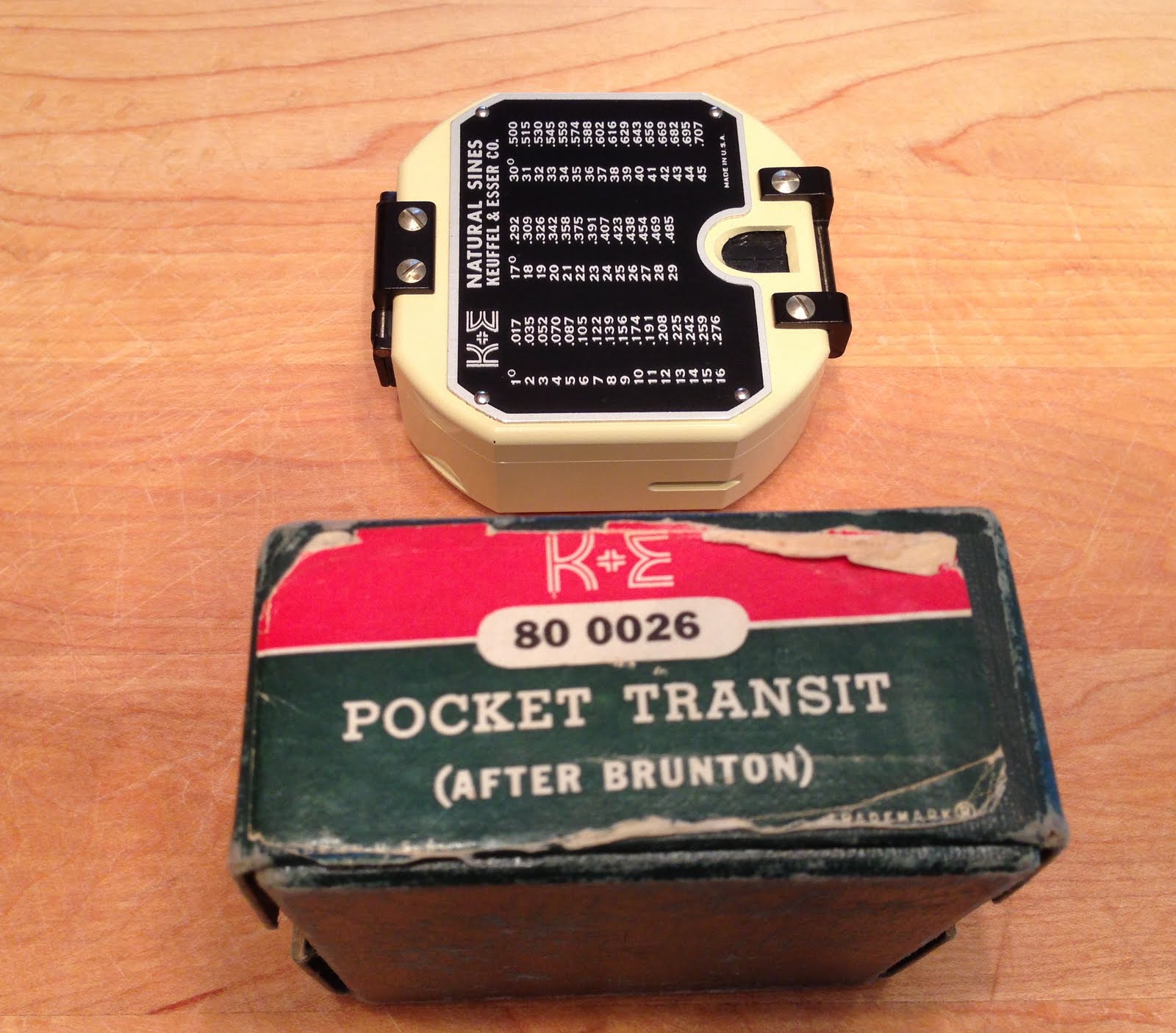
K&E Pocket Transit

It’s essentially a new-old stock (NOS) pocket transit made by K&E sometime in the early 60’s (judging by the dates in the instructional brochure).

Unlike Ainsworth or Brunton, K&E never serial numbered their pocket transits so there’s no way to firmly establish manufacturing dates.  It may be possible to determine an age range based on features, but the one source that discussed K&E pocket transit manufacturing date ranges, the outstanding William J. Hudson pages on the history of the pocket transit, have gone off line.  Let’s hope this great resource will soon be back up and available.

This particular pocket transit pretty much follows the Ainsworth model feature for feature.  It uses an un-dampened needle setup with luminous points and offers the standard long level on the clinometer and bubble level for general leveling.  It uses the 360 degree ‘reversed’ compass ring that is adjustable for declination. It’s immaculate inside and outside, and I doubt it had been handled much before I acquired it.

How well does it compare to an Ainsworth or Brunton product of the same age?  Pretty damned well!  K&E was a premiere American manufacturer of surveying and engineering equipment from the late 1800s right up into the early 1980s, and they knew how to make a quality product.  This pocket transit is equal to, and in some cases surpasses, the quality put out by either Ainsworth or Brunton.

All-in-all an excellent example of an American pocket transit.

The Englshman Who Went Up a Hill

…and came down a mountain.

It’s cold and rainy outside, the Mrs. is taking a nap and the dogs are too. I went looking for something quiet to do and stumbled upon my old copy of the quaint English film ‘The Englishman Who Went Up a Hill But Came Down a Mountain’


There aren’t many movies made about map makers, surveyors or cartographers. Damned few. The tedious film ‘The English Patient’ usually comes to mind, although the map making connection is just a plot mechanism to explain why a Hungarian count with an impeccable English accent is poking around Egypt and North Africa. I don’t think a map is shown in the entire movie.

In the opening scenes of ‘Lawrence of Arabia’ we see Lieutenant T. E. Lawrence helping to color a map in a military office in Egypt. This is a pretty accurate snapshot of Lawrence’s activities before he was sent out to foment revolt among the Arab tribes. Before WWI Lawrence worked extensively as a field archaeologist in the Transjordan region and was a skilled map maker. During WWI he was initially employed in making military maps of the Middle East. Back then cartography and field survey were essential skills for explorers of all types and Lawrence was no exception.

There’s lots of other movies with oblique references to maps, mapping and surveying. The Indiana Jones series comes to mind, as does the 1999 movie ‘The Mummy’, but that’s about all I can t hink of right now.

So back to our movie. ‘The Englishman Who Went Up a Hill But Came Down a Mountain’ is the only film I can think of that revolves around surveying and cartography. The movie is loosely based on the true story of a group of Welsh villagers who, during World War I, conspire to have two British Ordnance Survey cartographers designate their local hill a true mountain so they can continue to lay claim to having “the first mountain in Wales.” At its heart the movie is the story of a village, devastated by the loss of its young men on the battlefields of France, that struggles to retain its dignity. There’s also a charming love story woven into the plot between one of the cartographers (Hugh Grant) and a local girl (Tara Fitzgerald). The film is stuffed full of colorful characters who are all in cahoots to keep the cartographers in town while they surreptitiously add 20 feet to the top of their hill so it meets the minimum elevation requirement to be called a mountain. Hence the somewhat long title.

The movie is a charming period piece. Whoever did the costuming did a great job. The scenes of the two cartographers working atop the mountain, kitted out in all sorts of period field gear are fun to freeze frame through (I particularly like Hugh Grant’s leather map case). The one glaring mistake the director made is having the crew use a dumpy level in the place of a surveyors theodolite to measure the angles between adjacent hills, but I’ll forgive that slight hiccup. Everything else looks spot-on, including the scene where Hugh Grant is doing some preliminary cartography work using an adjustable steel tipped pen and bottles of ink.

Here’s the scene where the locals get the word that their mountain is really a hill. Colm Meaney plays the local pub owner, town cad and ringleader of the whole effort, and is a hoot to watch:

The movie is slow and charming. A classic little English gem. It would be a great film without all the mapping and surveying stuff, but having it all in there makes it even better.

Highly recommended for rainy days.

End Of An Era

I got news a few days ago that the last class of Army topographers (today they are called Geospatial Engineers) has graduated from the NGA College at Fort Belvoir, Virginia.  The course will be moved to Fort Leonard Wood, Missouri in November.

This graduation, which took place on August 2nd, marks the end of Army Engineer training of any sort at Fort Belvoir.  It is the end of an almost 100 year presence at Belvoir, which openend in 1915 as an Army Engineer training ground and was originally named Camp A. A. Humphreys.

Fort Belvoir was always the traditional home of the Engineers.  It housed not just the Engineer School but also the offices of the Chief of Engineers and several key Engineer labs, including the Engineer Topographic Lab which today is designated the Army Geospatial Center.

At one time all Engineer officer training took place at Fort Belvoir (I attended my Engineer Officer basic and advanced courses there) but over time most Engineer enlisted training was moved to Fort Leonard Wood, which offered more training and maneuver space.  However, all formal topographic engineer training, for both officer and enlisted, remained at Fort Belvoir at the Defense Mapping School.

In the late 1980s the Chief of Engineers made the decision to move all Engineer training – officer and enlisted – to Fort Leonard Wood.  The decision was no surprise; the Engineers had been talking about it for years.  Still, it was sad to see the them vacate their traditional home.

As part of the move I know the Engineer School looked at ways of moving the Defense Mapping School to Leonard Wood, or at least relocating all Engineer topographic training to the new school.  The move didn’t take place for several reasons, but two key issues kept topographic training at Belvoir.  First was the fact that most of the courses were actually Joint classes – students from all military services, Department of Defense civilians and even a small population of foreign students were all mixed together in the same classes.  The other services and the Department of Defense liked the idea of having the training offered in the Washington D.C. area.  Apparently only the Army Engineers think central Missouri is an appealing locale. The other issue was equipment.  In the 1980s and well into the 90s much of the training at the Defense Mapping School involved the use of heavy base plant equipment like large printing presses.  Even the Army was still using large, heavy Heidelberg SOR offset presses for map printing.  This equipment could not be easily or cheaply moved from Virginia to Missiouri.  Much of it was no longer manufactured so it wasn’t like the Engineer School could just go out on the market and buy new equipment so the older stuff could remain in use back at Fort Belvoir.

Fast forward to the 21st Century.  The Army topographers are now called Geospatial Engineers and they long ago abandoned their old traditional map making ways for GIS software, digital data sets and plotters.  All you need to conduct topographic training these days are desktop computers and lots of bandwidth.  Apparently there was no longer any real need for these classes to remain at the NGA College (formerly the Defense Mapping School) at Belvoir.

The last class of Engineer Soldiers and the last class of Army topographers to train at Fort Belvoir have crossed the stage and received their diplomas.  A 97 year old tradition has ended.

Brian

A Quick Shout Out

Over the past week or so I’ve been dialoging with Harold ‘Hess’ Hester, owner of the Defense Mapping School alumni site.  What drew me to Harold’s site was an interest in locating an old Army buddy, CW3 Ralph Ruetze, who had served as an instructor at the school.

I learned from the website that, sadly, Ralph passed away in 2010.  However, Harold was eager to incorporate my memories of Ralph into his site.  Thanks Harold.  Ralph was quite a character and deserves to be remembered.

The Defense Mapping School (DMS) had the mission of training service members of all services, Department of Defense civilians and foreign students in the topographic arts and sciences – survey, cartography, graphics, press operations, terrain analysis, instrument and equipment repair and much more.  And they did an outstanding job.  The entire DMS organization – from the school registrar to the division chiefs to the individual instructors – went to extraordinary lengths to make sure our soldiers were well trained and well cared for while they were in the school’s care.

DMS was one of several agencies that included the Defense Mapping Agency, the Topographic Engineering Center, the Waterways Experiment Station and the Cold Regions Research and Engineering Laboratory that provided unstinting support to the field topographic units.  The sad truth is that these agencies often provided more support to Army topographic units than their own local Engineer commands did.

So my thanks to ‘Hess’ (and Jack Batt) for standing up a much needed home on the web for Defense Mapping School alumni.


Mapping

Mapping
I was going through some of my books and manuals this morning and stumbled across this old favorite.  I spent a few minutes flipping through the pages and was reminded just what an absolute gem of a book it is.  I consider it a minor classic.
As the author David Greenhood states in the first line of the Introduction, “This book has been written to be read rather than studied.”
 
And so it should.  This is not a textbook or a reference, it is an educated man’s introduction to the concepts of topographic mapping.  Authored by somebody who had a deep understanding of the subject and knew how to write for general audiences, it is readable, enjoyable and instructive.
Although this book was first published in 1944 and incrementally updated through 1964 it gives up little to the back half of the 20th century because it focuses on concepts rather than gizmos.  There’s not a word or hint of satellite navigation, space-based imagery platforms, world-wide datums and coordinate systems or computer-based mapping.
Greenhood’s discussions on things like scale, perspective, contouring, projections and map compilation are some of the best and easiest to grasp that I’ve ever encountered.  Greenhood’s coverage of these concepts stand the test of time because they don’t change over time.  Scale is scale, perspective is perspective, whether you are looking at a paper map or a computer screen.
Some of the topics seem quaint, like how to properly sharpen a pencil or how to select the correct paper for drawing a map, but the discussions are charming and still somewhat useful in today’s world.  Most of the referenced publications are out of date and long out of print, but it’s important to note that many of Greenhood’s references were classics in their own right and are themselves worth hunting down and reading.
One of the real strengths of this book are the illustrations.  Most of the illustrations are hand drawn and they remind us that a talented illustrator can easily convey complex information in  ways photographs can’t.  The illustrations are expertly integrated with the text and provide support and reinforcement to the topics under discussion precisely when and where needed.
I bought my copy of Mapping in 1982 at the bookstore in the Smithsonian Museum of American History in Washington, DC.  It has been paged through and referenced so many times the binding is starting to come loose.  This morning I jumped out to Amazon to see if the book was still available.  I’m pleased to see it is still published by the University of Chicago Press, but the price is an eye-bleeding $32.50 – quite a lot for a trade paperback.  However, copies are available from used booksellers for very reasonable prices.  I grabbed a new-condition copy from an Amazon partner bookseller for $6.95, not much more than the $5.50 I paid for my current copy back in 1982.
If you are at all interested in mapping, or want to introduce the concepts of mapping to a young audience this book is an excellent start.  I’ve read a lot of books on mapping down through the decades and this is the best single volume introduction to the field I’ve ever read.
Brian


GPS – It’s Not Just For Geocachers!

OK folks, let’s put on our big boy pants and play grownup GPS.

“Look at me!  I know how to use GPS for
something other than geocaching!”
I’m involved in a test at a very large and very busy airport to determine the feasibility of using inexpensive handheld GPS receivers as reconnaissance tools for our engineering and facilities staff.  The consumer market is crammed with relatively inexpensive GPS devices and any one of those should fit the need.  We are not necessarily looking for accuracy here; most dedicated GPS units made these days offer plenty enough accuracy.  More important for our project is ease of use, the ability to import a fairly high resolution background image of the airport and the ability to provide coordinate read-outs in our proprietary (i.e., non-standard) grid system.
Let’s start with the proprietary grid system issue.  It may sound daunting, but it’s really not.  A fair number of low end GPS units provide what’s called a ‘user coordinate system’ setting.  The user just needs to provide a center point for the grid (in lat/long), a false northing and easting for the center point, a scale factor and few other bits of information.  It’s pretty straight forward, and we’ve been able to program a 13 year old Magellan 315 to handle the task.  The Magellan 315 was a hot-spit GPS unit in its day but by today’s standards it is out dated.  It is relatively slow to boot up, slow to acquire and lock onto satellites and it doesn’t receive WAAS signals.  Still, it is easy to operate, the screen is a classic example of uncluttered high contrast clarity and it takes user coordinate system definitions without breaking a sweat.  Once it was up and operating it provided perfectly acceptable accuracies.
Magellan 315
Simple to operate and
has no issues with operating under
a proprietary grid system
Next we tested a seven year old Thales Mobile Mapper.  The Mobile Mapper was a piece of kit left behind at the close of a project several years back.  The contractor bought it to help locate underground utility marker balls and turned it over to the airport when the contract ended.  It’s an odd duck piece of gear – not friendly enough to take on a fishing trip but not sophisticated enough to satisfy surveyors.  Still, it was perfectly willing to accept our coordinate system definition and returned fine accuracies.
Thales Mobile Mapper
So we proved it’s possible to program our coordinate system into inexpensive GPS units.  It should be a simple task to identify a more modern unit that fit our performance and budget requirements.  This is where things got interesting and frustrating.  Our quest has revealed an ignored market segment for GPS units and leaves us scratching our heads and wondering just where the consumer GPS market is heading.

____________________________________________________________
GPS is marvelous technology.  It has removed the great uncertainty in wayfinding and positioning that has vexed mankind since the first caveman decided to go from here to there and his wife told him where to turn.  The real genius of GPS has been in the integration of the location signal (and that’s all GPS really is – a bunch of signals from satellites in the sky that provide the information a GPS receiver needs to calculate a position) into devices that leverage that location in unique ways.
Twenty years ago a ‘consumer grade’ GPS was an expensive piece of gear that did little more than provide a location and allowed you to store a few dozen waypoints.  In 1999 I purchased the Magellan 315 used in this test for $300, and was happy to get it at that price.  Today $300 buys a unit that provides a position fix that is twice a precise as the 315, uses a high resolution color touchscreen display, stores thousands of waypoints, has a digital 3-axis compass, a barometric altimeter and a digital camera that takes geotagged images.
But the success of the integration of dedicated GPS receivers is also proving to be their undoing.  Here’s why.  I can walk into just about any AT&T, Verizon, T-Mobile, Wal-Mart, Target or Best Buy and purchase a smartphone that offers these same features for about $200 (if I sign up for a service plan).  But in the package I also get a phone, a messaging device, a video chat device, an internet device, a music player, a game console and much more.  The integration of GPS into common consumer devices like phones and tablets is killing the dedicated GPS industry. It’s not that highly integrated devices like the iPhone are better GPS devices – far from it.  The real problem is perception.  When pondering the purchase of a dedicated GPS unit the average consumer glances at his or her smartphone and asks, “why spend another couple of hundred bucks when I already have GPS and a mapping application rolled up into this device?”

Most consumers are not educated enough to understand that a dedicated GPS unit offers features that make it uniquely suited to outdoor use in rugged environments.  GPS integration in a smartphone is a compromise, particularly the antenna system.  On a smartphone GPS has to coexist with a range of other receivers and transmitters that all require their own antennas – cell, wi-fi, Bluetooth, etc.  A smartphone is first a phone, and other features like GPS get secondary design consideration.  But with a dedicated GPS unit optimized GPS reception and performance is the primary design goal.  First and foremost we expect a GPS unit to provide fast and accurate position fixes under a wide range of conditions.  If you want to know where to find the nearest Starbucks get a smartphone.  If you are on a seven day backpacking trip and its been raining the last three days and you want to know where the next campsite with a bear box is located get a dedicated GPS.

So let’s take a closer look at how the market is broken down.

Today’s dedicated GPS devices fall into three broad categories.
1. Consumer grade devices like we are discussing here.  This market is focused mainly on those participating in outdoor sports like geocaching, hiking, biking, fishing, etc.  These devices cost between $200 and $700, with the bulk of sales taking place at around the $300 price point.  This is the market segment that receives brutal competition from other consumer devices like smart phones, and the manufacturers are scrambling to find a niche and stay relevant.  Garmin, Magellan and DeLorme are the three leaders here.
The Garmin eTrex is perhaps the most
successful line of consumer GPS units in the industry
2. Dedicated map data or field data collection devices.  These are handheld units running mapping software like ESRI’s ArcPad and are used by organizations like utility companies to collect information in the field.  These mapping devices have an entry price point of around $1,000 and can go up to over $3,000.  Most of these units offer more GPS accuracy through the use of improved antennas and better software, but offer fewer features like digital compasses and altimeters.  The big attraction with these GPS units is the flexibility of the mapping software and the ability to directly ingest the collected data into high end desktop mapping software like ESRI’s ArcGIS suite.  The additional cost for these dedicated GPS units is the result of a smaller market share, higher hardware costs and the increased cost of the the operating system (usually Windows Mobile) and the mapping software.  Trimble Navigation dominates in this market.
Trimble Juno
No compass, no altimeter but hey,
at least it runs Windows!

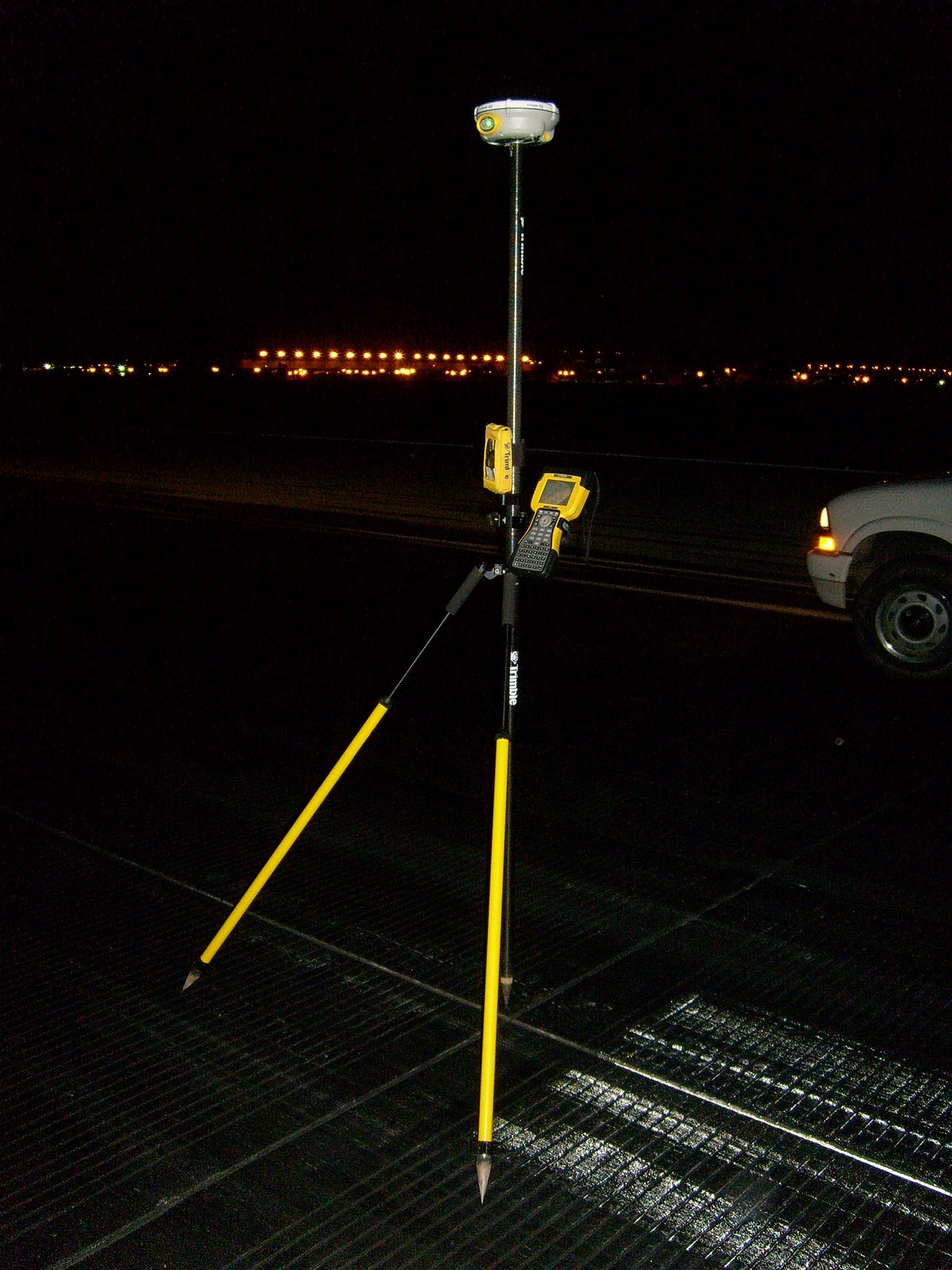
3. The high end market is dominated by survey-grade GPS units that start around $5,000 and can peak out at over $30,000.  For that price (along with a subscription to a real-time correction service that runs a few thousand each year) the user gets accuracies on the order of a few centimeters horizontally and vertically while working on-the-fly.  Not for the casual user, but it is interesting to note just how much accuracy thirty grand can buy.

A GPS-based surveying system.  This unit is capable of accuracies
of +/- 4 cm within 5 seconds of being placed over a point.
How big is 4 cm?  About the size of a poker chip.
Not for the faint of heart, though.  The saucer-shaped thing at the
top of the pole (Trimble R8) is the high accuracy
GPS receiver and it alone costs about $8,000
____________________________________________________________
OK, back to our original topic.
The goal is to find a GPS receiver that:
a. comes in at around the $250 – $300 price point
b. can use our custom coordinate system
c. can use a high resolution aerial imagery as a background map
d. is easy to use – should be almost a ‘grab-n-go’ device
e. collects simple data points, lines or polygons in a format we can easily bring in to our GIS and CAD systems

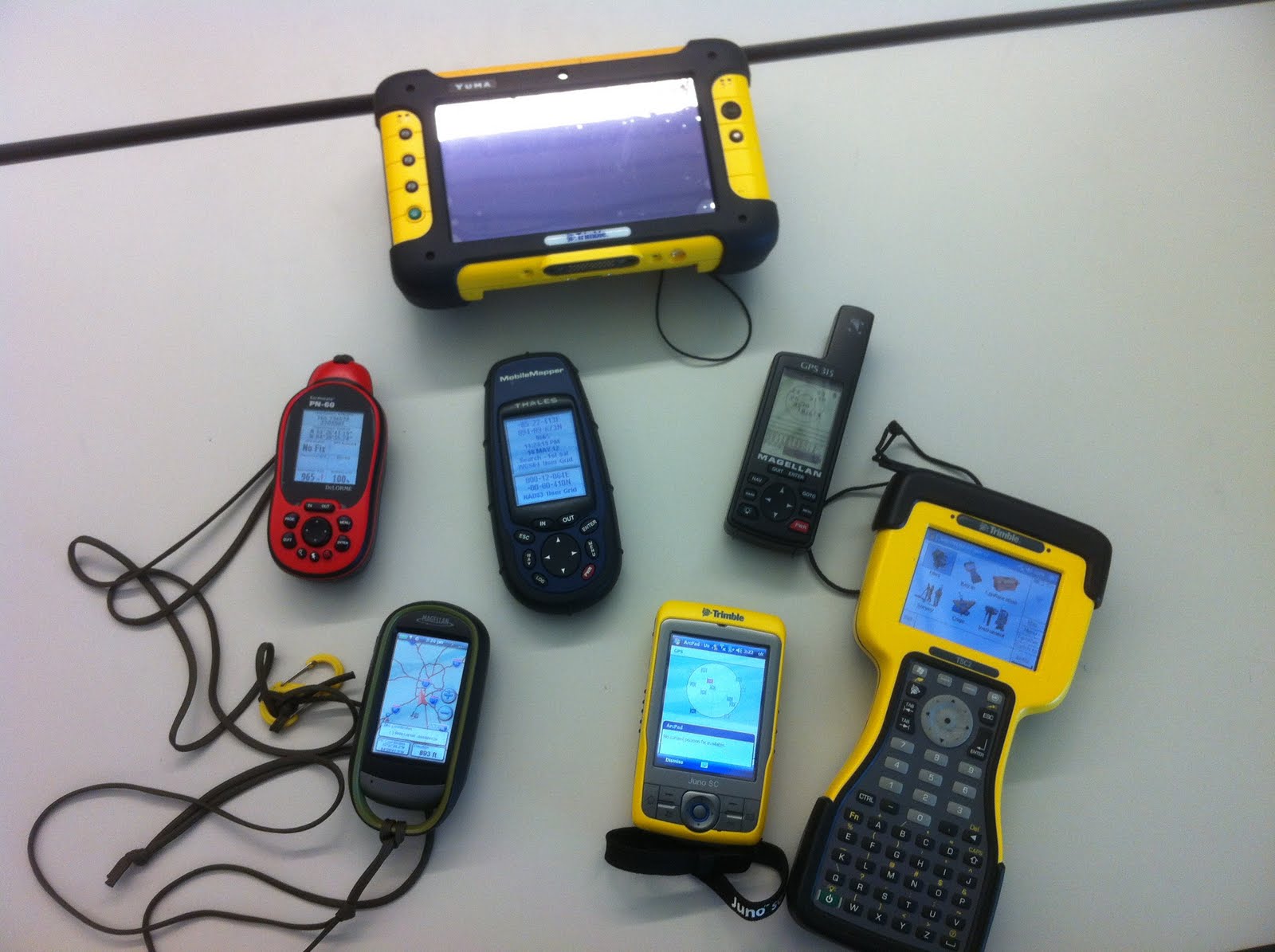
We selected a fair number of units to test – the Magellan 315 and Thales MobileMapper mentioned earlier, a Trimble Juno and Yuma, a Magellan eXplorist 610, a DeLorme PN-60 and a Garmin eTrex 20.

Top – Trimble Yuma
Middle – DeLorme PN-60, Thales MobileMapper, Magellan 315
Bottom – Magellan eXplorist 610, Trimble Juno, Trimble TSC-2

The DeLorme and the eTrex quickly fell out of the competition.  The DeLorme does not support user coordinate systems (a very disappointing shortcoming in an otherwise outstanding GPS unit).  The eTrex does have a user coordinate system setting, but it only works in meters (our custom airport coordinate system is set up in feet).  I was really pulling for the eTrex 20 because it’s the cheapest of our test samples ($175 Amazon price), has a good screen, an intuitive menu system and its receiver tracks both the US GPS and the Russian GLONASS satellites.  Alas, Garmin tech support could never figure out how to get it to provide readouts in feet so back to the store it went.

The Trimble Yuma is really a tablet computer running Windows 7.  It is a very capable device, but at the $5,000 price point falls way outside of our test objectives.

The Trimble Juno is an interesting unit.  It is essentially a highly customized PDA that runs Windows Mobile 6.1.  This Juno is really the lowest entry point in terms of price and features for a serious handheld GPS mapping and field data collection device.  Unfortunately the entry price is still too steep for this test – the hardware itself costs around $1,000 and the software needed to do field reconnaissance and data collection – ESRI’s ArcPad – runs an additional $400.  A good device, just too expensive and too complex for the non-technical user.

The Trimble TSC-2 seen in the picture above is not really a GPS receiver.  It is a survey-grade data collector that pairs with a high precision GPS receiver via Bluetooth (we use a Trimble R8) .  I threw it into the picture just for comparison.

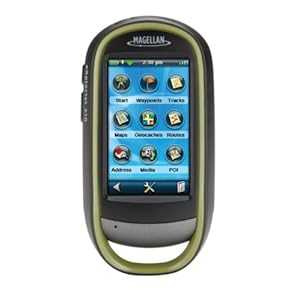
The Magellan 610 pulled ahead early in the competition.  It’s a mid-sized unit that’s a bit chunky but fits well in the hand.  It uses a touch screen interface and it includes a 3.2 mp camera that geotags each image.  After some fiddling it took our custom coordinate system and returns very good accuracies on the order of +/- 10 ft.   I should mention that a large airport is an ideal location to test potential GPS accuracy since you have open skies horizon-to-horizon.  If the GPS satellite is above the horizon your receiver will see it.  No trees, buildings, towers, etc. in the way.  So please, don’t take my accuracy results as gospel.  Your real world results will vary.

Magellan eXplorist 610
A very capable little device

Where the Magellan 610 stumbles is ease of use.  It has a lot of features – GPS, camera, compass, barometer and altimeter.  It is a jack of all trades and, to be honest, most features are fairly well integrated.  However, learning to use them takes time and it’s easy to get lost in the touchscreen menu system.  The Magellan also suffers from a disease that afflicts most other consumer grade handheld GPS units – ‘gamesmanship’.  In an effort to attract new customers manufacturers like Magellan, Garmin and DeLorme have built their user interfaces around the game or sport of geocaching.  It’s a fun game and a great way to get tech savvy kids off their asses and into the outdoors.  The low end GPS manufacturers see this as a market niche they can exploit and have structured most of their unit’s features around geocaching.

The problem we face is that geocaching-oriented GPS units makes lousy general purpose or field data collection units.  By focusing on geocaching the manufacturers have ignored the needs of a whole different market segment – the map data developer.

A weak coordinate system library, the lack of a GIS-industry standard vector data format such as the ESRI shapefile, weak data attribution tools on the GPS unit and a weak desktop mapping interface all hinder the use of these units as data collectors.  DeLorme comes the closest with it’s XMap desktop GIS software, but the cost is over $800 per license it continues to use a proprietary vector data format linked back to the PN-series receivers.

What the industry needs is a low-end map data collector that has a simplified interface optimized for adding and attributing data collected in the field.  It needs to use industry standard vector and raster data formats and should come with a more robust desktop mapping interface oriented towards the field mapping industry or enthusiast.  Magellan seems to be dipping its big toe back into this market with the Magellan eXplorist Pro 10, but this device still requires a third party software package like ArcPad and offers no improved desktop mapping software.

Magellan eXplorist Pro 10
This is just a re-packaged Magellan 610, but a good start!

So GIS industry wonks, here’s what I want:

1. a handheld GPS unit with a large, high resolution screen that is easy to read in broad daylight

2. consumer-grade accuracy using WAAS correction

3. a user interface highly optimized for field data collection – no third party software requirements!

4. a robust horizontal and vertical coordinate system library and the ability to accurately define a user coordinate system

5. a 5 megapixel digital camera with flash

6. the ability to configure field collection jobs or scenarios and save them as project files

7. twelve hour continuous use battery life

8. an external antenna port

9. fully waterproof

10. improved desktop software for device configuration and data download and upload

11. use of industry standard vector and raster data formats

And I want this all at a $700 retail price point.

So get to work.  I expect some nice surprises in your 2013 lineups!

– Brian

History Revealed! Origins Of The Army Lensatic Compass

For several years I’ve been trying to piece together the history of the US Army’s lensatic compass.  In an earlier post on this blog we discussed the various types of compasses and a bit of the developmental history that can be inferred by viewing the examples in my collection.  However, there was (and still is) very little solid history on the development of the lensatic compass available on the web.

For an item as ubiquitous as this compass the lack of historical data seems a odd.  The development and usage histories of many other items of WWII-era equipment are well documented.  Take the M1 Garand for example.  Collectors can discuss in detail every single part on that rifle and can accurately date and discern the manufacturer of each part by noting subtle differences in how the piece was machined or finished.  This wealth of knowledge is due to the fact that the development and production records for the Garand were made available decades ago by the US military and the various manufacturers.  Of course collector interest is also a factor.  The Garand is one of the most collected pieces of WWII equipment and when you have thousands of collectors clamoring for detailed information the odds are pretty good someone is going to unearth the data.  Since there can’t be more than a dozen serious collectors of Army lensatic compasses there’s a whole lot less clamoring.

As an item of individual equipment that guided millions of Soldiers across the battlefields of Europe and the Pacific in WWII, and continues in use by our Soldiers today, I’ve always felt the history of the lensatic compass deserved better coverage.

Earlier this week I was on a different quest.  I recently purchased an interesting bit of Army topographic kit, a Vertical Sketchmaster (I’ll do a posting on that later).  Since the device came without paperwork or documentation the first thing I did was hit Google for a quick search.

[A short segue here.  Hey Google, your search results are starting to look like those from the half dozen or so search engines that have all but fallen off the internet.  When I do a search on your site I’m looking for real results, not page after page of ads or eBay listings.  Any more, searching on Google is like searching on – dare I say it – Yahoo!]

Buried about three pages deep in the search results was a reference to a holding in the Defense Technical Information Center (DTIC) titled “History of [the] U.S. Army Topographic Laboratories (1920 to 1973)”.

The phrase “Army Engineer Topographic Laboratories” got my immediate attention because the document could only be referring to what used to be know as the Army Corps of Engineers’ Engineer Topographic Laboratories, or ETL.  ETL and it’s predecessor organizations within the Corps of Engineers served (and still serve) as the Army’s R&D lab for development of topographic, terrain analysis and geospatial systems, processes and equipment.  Now called the Army Geospatial Center, it was an organization I called on many times during my career for support and advice, and they always came through.

As luck would have it the document is available in digital form through Google.  I immediately downloaded it and started reading.  Published in 1973 as an ETL internal paper by John Pennington, it is a short rundown of the history of the Army’s topographic R&D labs and covers major projects and equipment development between 1920 and 1970.  I don’t want to spend too much time on this document in this post, because I feel it deserves it’s own separate discussion at a later date.  For now I’ll just say it is a treasure trove of historical information.

While reviewing the document for information on the vertical sketchmaster I quickly came across discussion of lensatic compasses.  This was something completely unexpected.  I never considered that the development of the lensatic compass was something an Engineer topographic R&D lab would have been involved with.  After reading the entries it now makes perfect sense – the Engineers had doctrinal responsibility for development of land navigation equipment and were the Army’s subject matter experts on compasses of all types.  While the development of land navigation techniques including the use of map and compass was the responsibility of the Infantry School, development of the compass as an item of equipment was the responsibility of the Engineers.  Of course the two branches worked hand-in-hand on the project, with the Engineers serving as a test and development agency in support of the Infantry School.

The document briefly discusses compass development both prior to and after WWII and adds some fascinating tidbits to the history of the development the lensatic compass:

Since the quality of the scan is pretty poor I’ve reproduced the key parts below:

(7)  Compasses.  Although the compass is not strictly a surveying instrument, considerable effort was expended by the Mapping Branch of the Engineer Board in the World War II period on the development of small compasses for Infantry and other arms.


The work started in 1938 when the Infantry requested that an inexpensive, commercial-type compass be found to replace the marching compass then issued because the marching compass was too large, elaborate, and costly.  This investigation was assigned to the Engineer Board, and it was soon found that no suitable commercial compass was available.  The W. & L.E. Gurley and the Taylor Instrument Companies, however, were willing to make a suitable compass based on a new design; and each company made six samples in 1939 as ordered from the Engineer Board.


After testing by both the Infantry and Cavalry and some modifications by the manufacturers, in November 1940 the Engineer Board recommended procurement of the cheap lensatic compass from both manufacturers.”


Thus we have the WWII-era M1938 lensatic compass.

M1938 Lensatic Compass
My question now is, was this originally a liquid filled model?  Read below.

One interesting point is that while lensatic compasses made by Gurley are fairly common (they were a major manufacturer of surveying equipment at the time) I have never seen a military lensatic compass made by Taylor Instruments.  However, Taylor Instruments did go on to be a major manufacturer of wrist compasses for the US military in WWII.

But the story is not over.  Even back in 1940 they were struggling with the issue of how to dampen the compass needle or card.

“Since the mechanical dampening arrangements in all compasses available up to that time had not been entirely satisfactory, the Engineer Board started investigations of liquid dampening in December 1941.  Compasses of both the lensatic and the wrist type with liquid dampening were developed, tested, and adopted in the 1941 to 1944 period; and it was thought for a time that the compass problem had been solved.  However, it was discovered that, with temperature changes, an air bubble often developed in the compass capsule which impeded the free movement of the compass needle and affected the accuracy.


In July 1944, the Superior Magneto Corporation, one of the liquid-filled compass suppliers, solved the liquid  dampening problem by applying the induction dampening principle.  The compass body was made of copper which set up an eddy current and magnetic field as the compass needle rotated, thus acting as a drag to dampen the needle oscillation.  Samples were immediately procured and tested.  As a result, the induction dampened wrist compass was standardized in April 1945, and the induction dampened lensatic compass was standardized in May 1945.”


Based on the number of WWII compasses available for sale from auction sites like eBay I think that Superior Magneto was the #1 supplier of lensatic compasses during WWII.  Knowing their core business – the production of magnetos – it makes sense that their engineers would have a clear understanding of the principle of induction and how to apply it to the problem of compass needle dampening.

Today M1938 compasses with induction dampening are easy to identify.  They have a white compass bowl that contains the compass card.  The white bowl is the stamped copper cup that the compass magnet interacts with to slow oscillation.  It is an excellent dampening system and is still used today in US military-issue lensatic compasses.

M1938 Lensatic Compass with induction dampening.
Note the white compass bowl.  This is really a stamped copper cup that interacts
with the north-seeking magnet to reduce oscillation of the compass card.

Let’s skip forward now to the late 1940s, when it was clear that the lensatic compass was in need of an upgrade.

(3)  Compasses.  The development of compasses, both the wrist and the lensatic types, was reopened in 1947 to provide instruments which would overcome the deficiencies noted in those developed during World War II.  Experimental models of the lensatic compass were produced by Taylor Instrument Company, Rochester, New York (Fig. 84), and the Brunson Instrument Company, Kansas City, Missouri.  Both were found to conform to the military characteristics, but the Brunson model was considered superior.  Experimental models of the wrist compass were produced by the Brunson Instrument Company, Kansas City, Missouri (Fig. 85), and were delivered to ERDL in January 1950.  Cold weather tests of the lensatic compass were conducted at Fort Churchill, Canada, and in January 1951 service test models were procured and shipped to service test agencies.  Here again, as with the compass development during World War II, emergency procurement of large quantities of both compasses were made before all testing and development had been completed.


Development of both compasses was completed in 1952.  The lensatic compass was classified as standard type, and the project was closed in November 1952.”


The result of these tests and type classification are the classic M1950 Lensatic Compass, a design still in use today:

M1950 Lensatic Compass produced in 2010 by Cammenga.
Today Cammenga is the sole contractor producing lensatic compasses
for the US military.

The M1950 is still one of the best compasses ever developed, and I consider it the best military compass ever issued to any military anywhere in the world.

Are You Lining Up With The Dinosaurs?

Yesterday there was an interesting article posted in the NY Times Business Day section about a sharp scientist and entrepreneur named Gilan Elbaz and his company Factual.

In layman’s terms Factual can be described as a data warehouse.  A real BIG data warehouse.  But beyond being just a big storage bucket in the cloud, Factual applies quality values against the data and puts it into context.

The real message here is that Factual is structuring it’s data holdings to accommodate and enhance automated spatial analysis and reasoning.  The goal is that highly intelligent software systems, acting against quality data, will perform much of the same complex spatial analysis and decision support operations that human GIS analysts currently do with desktop applications like ArcGIS.

In the future – and the future isn’t too far off – high end software packages like ArcGIS will be nothing more than embedded applications in larger, highly intellegent software systems.  Think I’m joking?  Ever heard of ArcObjects?

So, can you read the writing on the wall?  Can you hear me stomping my foot on the floor?  Do you get the hint?

If you are a GIS ‘professional’ and you describe yourself and your role in an organization in relation to the software you use you are a dinosaur, and you are headed for extinction.

The Geospatial professional needs to be a complex problem solver, not a software jockey.

Adapt or die.

Old School Map Making

I was wandering through YouTube at work today (shhhhh…) and stumbled on this neat old Army training film that describes the steps required to make a paper topographic map, circa 1973. The steps in this movie really didn’t change for about 60 years, from the late 1920s to around 1990 or so.  In fact, not a whole lot if the equipment changed, either. Sure, there were a few improvements here and there – better materials, more accurate surveying equipment and better aerial photography cameras – but the basic steps remained pretty much unchanged.  Of course today it is all different; digital satellite imagery, GPS, LiDAR and desktop computers have fundamentally changed the mapping profession. But for now let’s celebrate the old ways, when men were men, theodolites didn’t have any electronic components and cartographers wore ties while they worked at their light tables.  This movie (broken into three parts by YouTube) was filmed mostly at the old Defense Mapping School at Fort Belvior, VA: Part I:

Part II.  Now, part II is interesting because I swear the soldier who is shown working at 5:40 is an old friend, Norm Price.  I first met Norm at Fort Lewis in in 1987.  Norm had been a Cartographic Technician warrant officer who recently converted to the new Terrain Analysis Technican field (MOS 215D) just before I met him.  If I remember correctly he entered the Army in the late 60’s, so it is entirely possible for young Specialist Price to have appeared in this film:

And Part III:

Enjoy!

– Brian