What’s A Map Maker Look Like?

Mrs. OldTopographer reminds me regularly that I’m a geek and that she lives in the House of Useless Knowledge. I do retort that I’m not the one with the masters degree in math education, but to no avail.

Her accusations are clearly unfair. Yes I like maps. And mapping, photomapping, field sketching, surveying, navigation, compasses, GPS, GIS, geology, geography, geodesy, landform analysis…

OK, I’m a geek.

GeekyProfessor

But not that kind of geek.

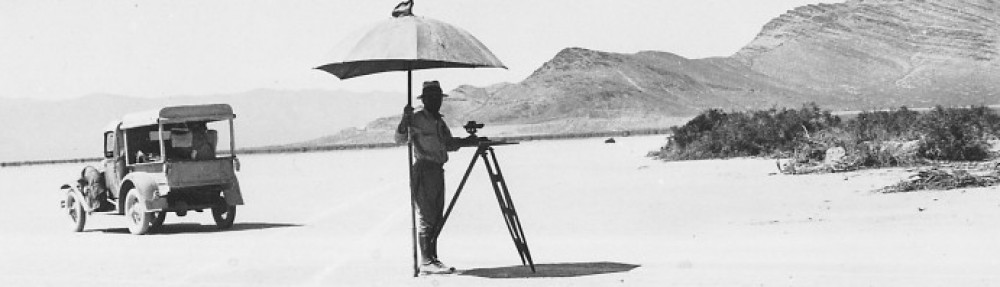
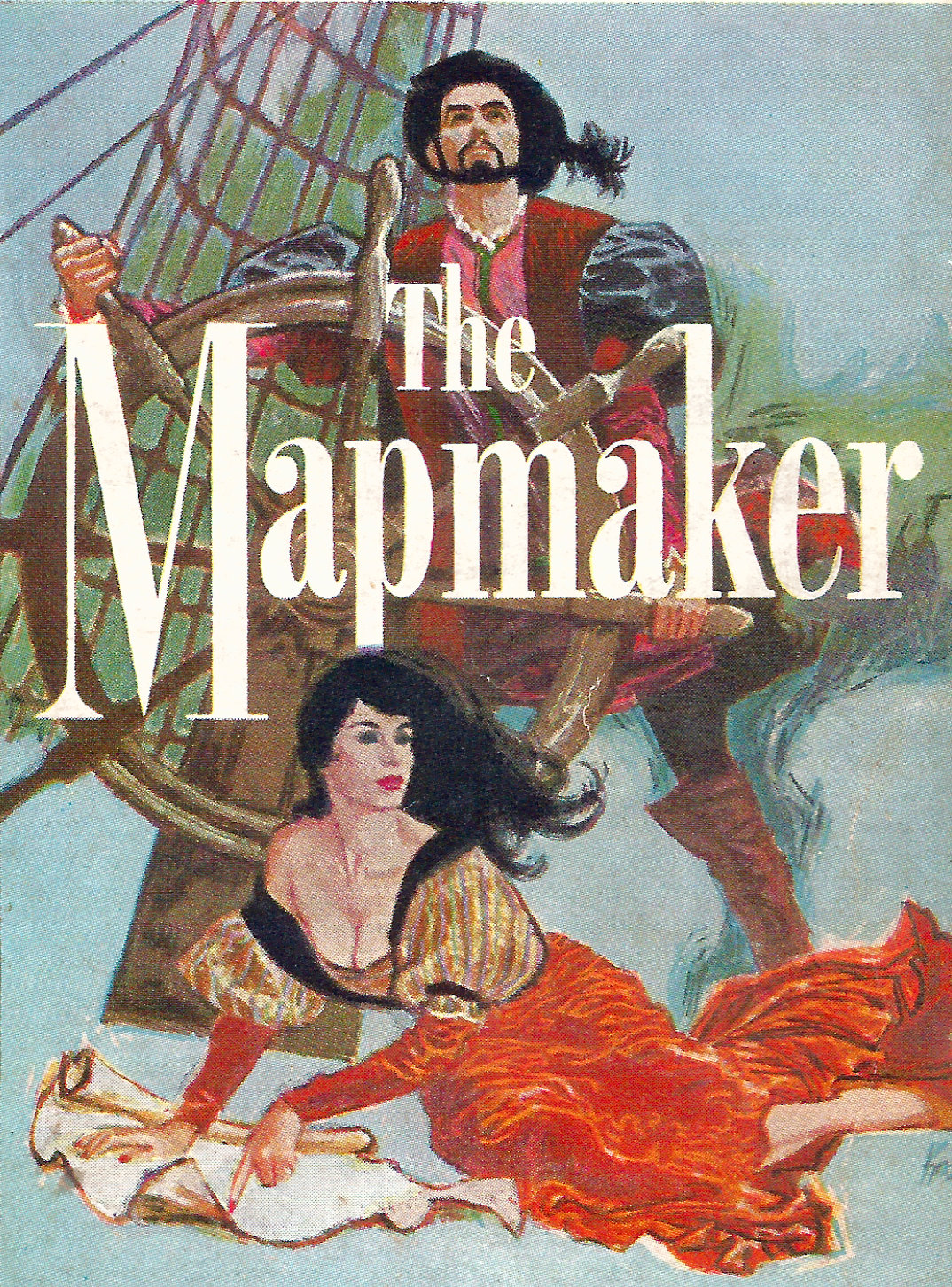
I’m more of a collaborative geek, someone who understands the value of teamwork. I like working with others. As long as they do what I tell ’em to do. So maybe I look like one of these folks.

Mapmakers Image

Naaaah…

None of these photos reflect my true adventurous spirit, my willingness to court danger, my aggressive Type A map making nature that has me living life on the edge.

This is who I am!

Mapmaker3

And that’s Mrs. OldTopographer, letting me know that I’ve missed the turn. Again.

– Brian

The 2014 ESRI UC

Well kiddies, I’m back from San Diego and the 2014 ESRI International User Conference. This is my third conference in five years, and it’s starting to feel like Groundhog Day.

Now please, do not get me wrong – it was a very good conference and in some respects it was a great conference. I and my team learned a lot and picked up a lot of new information.  But in the plenary and in the technical sessions and presentations side it was the same drumbeat we’ve been hearing for the past several years – ‘rich’ web maps and apps (could someone in ESRI please tell me just what ‘rich’ means?), ArcGIS as an integrated system, not just a bunch of parts, ArcGIS Online, ArcGIS Online, ArcGIS Online, yaddah, yaddah, yaddah.  In the Solutions Expo (i.e., vendor displays) it was the same vendors, many in the same locations, showing the same stuff, giving the same spiel, etc.

You know, Groundhog Day. C’mon ESRI, mix it up a bit. It’s getting a little stale.

OK, that’s out of the way.  Let’s change tack. If you listened closely to the presentations and have been paying attention to what ESRI’s been doing in the past few months you were able to tease out some great information regarding new and emerging capabilities. Let’s start with one of ESRI’s current flagship product, ArcGIS Online.

If anyone reading this blog still doubts that ESRI considers ArcGIS Online and web mapping a central part of ESRI’s GIS universe then this UC would have set you straight. The message was obvious and unmistakable, like a croquet mallet to the head. ArcGIS Online is here to stay, is only going to get bigger, and if you are going to play in the ESRI sandbox you need to know (and buy into) ArcGIS Online. I didn’t attend a single ESRI session, whether it was the plenary or a one-on-one discussion with a product expert where the topic of ArcGIS Online integration didn’t pop up early and often. Most vendors I talked to – and certainly all of those that ‘got it’ – had ArcGIS Online integration as a key selling point for their product or service. Heck, even IBM with their painfully complex work order management program called Maximo ‘got it’ and touted how I could now ‘easily and seamlessly’ integrate ArcGIS Online feature services with Maximo. Anybody who knows Maximo knows it doesn’t do anything ‘easily and seamlessly’. I don’t really think Maximo can use hosted feature services from ArcGIS Online, at least not yet. The REST endpoints I saw Maximo consuming looked like dynamic map services. But at least the IBM sales team took the time to read the memo from Redlands.

ArcGIS Online

The ArcGIS Online product space was the single biggest product presence ESRI had set up in the Expo. It was huge, and a reflection of the importance ESRI places on the product

ESRI’s incessant chatter about ArcGIS Online would have fallen flat with those who are long time users of the product if ESRI had not done a product update just a few weeks ago. The July update of ArcGIS Online included a number of significant improvements and new features that signaled to those who know the product that ESRI is serious about ArcGIS Online being more than just a toy for making simple web maps. The upgrades in system security certification, administration tools, data management, data integration, analysis and cartographic tools shows ESRI has full confidence in ArcGIS Online as a serious enterprise tool.  I’ll admit that a few years ago I was having doubts that ESRI would be able to pull this off. Today I’m convinced that ArcGIS Online and web mapping is the most significant development in geographic content delivery since the invention of the printing press.

This year I spent more time wandering the Solutions Expo hall than I did attending the technical sessions. In past years there were sessions I felt I just couldn’t miss, but this year my technical needs were somewhat less well defined and I wanted to spend more time speaking with the vendors and visiting the ESRI product islands. It was time well spent.

One of the focuses (foci?) of this year’s plenary presentation was the issue of ‘open data’. Open data is nothing more than data that is available free to any user. Open data can take any format (though it is understood that for data to be truly ‘open’ it needs to be available in a non-proprietary format). For decades the federal and state governments have made GIS data available in a variety of GIS formats. A good example of this is census data. The data for most censuses held in the last 40 years or so is freely available in GIS format from the US government. It’s easy to pull that data into a GIS system and do all kinds of analysis against it. In fact, census data is one of the first data types that new GIS students learn to analyze in their core classes. In the same vein, many states make state-specific GIS data available from freely accessible data servers. Things like elevation data, transportation network data, hydrology, landcover and more have been commonly available for years.

However, it was often difficult for smaller government entities – cities, counties, or regional authorities – to share out their public data because of the IT and GIS management overhead involved. Let’s face it, nobody makes money sharing out free data so there’s little incentive to put a lot of resources behind the effort. As a result a lot of currently available open GIS data is pretty stale. ESRI is backing a push to pump new vitality into the sharing of open data via the new Open Data tools embedded in ArcGIS Online (see, there it is again). OK, I admit that ArcGIS Online isn’t exactly free to the organization looking to share out data, but if you do happen to be an ArcGIS Online subscriber then setting up an Open Data site is fast and easy. One of the great concepts behind ESRI’s effort is that the organization is really sharing a feature service from which an Open Data user can extract the data. This means that the data should not suffer from ‘shelf life’ issues; as long as the data behind the feature service is regularly updated the Open Data user will have the latest and greatest representation of what’s being shared.

On one of my laps around the Expo floor I stopped at the Open Data demonstration kisoks set up in the ArcGIS Online area and talked through the concept and implementation with one of the ESRI technical reps. At first I didn’t think my organization would have much use for this feature, but after thinking about they types of data we routinely pass out to anyone that asks – road centerlines, jurisdictional boundaries, parcels, etc. – I began to think this might be of some value to us. In about 15 minutes she helped me set up my organization’s Open Data site and share some common use data out to the public. If for no other purpose, an Open Data site could lift some of the data distribution burden off of us.

OpenData1

The new Open Data tab in ArcGIS Online allows the administrator to configure an open data page from which the organization can share data with the public

Another lap took me to the US Geological Survey information tables. The USGS table was set up in the Federal Government area and while most of the agencies suffered from a serious lack of attendee interest (and I pity the poor souls who had to man the Veteran’s Administration table), the USGS tables were doing a good business. The USGS reps were stirring the pot a bit. It seems that there’s a move afoot in the USGS to do away with the National Atlas. I’m not sure yet how I feel about this move. Clearly elimination of the National Atlas is a cost cutting move (and the USGS makes no bones about it on their website), but if the same digital data can be made available via other portals, like the National Map portal, then this may all be a moot point.  Still, this is the National Atlas and as such should be a point of pride not just for the USGS but for the nation. If for no other reason than that I’d keep it alive. The USGS reps working the tables were clearly pro-National Atlas and were running a petition campaign to garner support to keep the program going.

I also spent some time discussing the new US Topo series of maps with the USGS reps. If you’ve read any of my posts on the US Topo maps you know that from a cartographic perspective I think they stink. The map base – imagery – is poorly selected and processed and the maps looks like crap when printed out. That’s the basic problem; the US Topo series are compiled as though the intent is to print them out full scale for use in the field. They carry full legends and marginal data. However, it’s clear they were compiled specifically to look best on a back-lit computer screen. When printed out the maps are dark, muddy and the image data is difficult to discern. When I brought this up to one of the USGS reps she turned her badge around to indicate she was speaking for herself and said, “I agree completely, and we get a lot of complaints about the visual and cartographic quality of these maps.” Here’s hoping the USGS doesn’t go tone-deaf on this issue and takes steps to improve the quality of the US Topo series. She also let me know that there’s growing support within the USGS to provide the US Topo series maps not just in GeoPDF format but also in GeoTIFF. This would be a great move, especially if the USGS provided them in a collarless format for use in systems like ArcGIS for Desktop.

I took the time to mosey over to the Trimble display area and talk to a rep about my favorite Trimble issue – the lack of a Google certified version of Android on their very capable (and very expensive) Juno 5-series of handheld data collectors. I’ve bugged Trimble so much about this that I have to assume my picture is hanging on a dartboard in the executive conference room at Trimble’s headquarters. I got the same response out of the Trimble rep that I’ve been getting for about a year now, “We hear it’s coming but we don’t know when”. Yeah right.

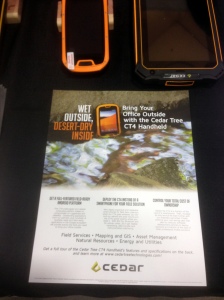
After I left the Trimble area I found myself a few rows over at the table of a company I’d never heard of before, Cedar Tree Technologies. It was just a couple of guys with a couple of pieces of hardware, but my eye caught something that looked a lot like a beefed up smartphone and the guys at the booth were eager to give me their story. It seems that Cedar Tree Technologies is a brand new spin-off of Juniper Systems, a company that’s been making rugged handheld systems for the surveying and GIS community since the 1990’s. Cedar Tree’s specific focus is on the Android OS, and each of the devices on display were running Google certified versions of Android 4.2. The device that caught my eye was the CT4. The CT4 is what it looked like – a ruggedized smartphone that runs on Android. It looked like an OK product with very good specs – a quad core processor running at 1.2 GHz, a 4.3″ Gorilla Glass display, and 8 mp camera, a 3000 mAh battery, Bluetooth and an IP68 rating.  It did have a few drawbacks – only 16 gig of system memory and a 3G (not 4G or LTE) cell radio, and I forgot to ask if it was fully GNSS capable. But here’s the kicker – this damned thing is only $489! Roughly one third the price of the baseline Juno 5, yet it looks like it offers 3/4 or more more of the Juno’s capability. You can bet I’ll be contacting Cedar Tree about borrowing one of these for an evaluation.

Cedar Tree1

 He’s smiling because he thinks he’s got Trimble beat in the Android space. I think he might be right!
 

Cedar Tree2

 The Cedar Tree Technologies CT4. Perhaps the first truly usable Android-based field data collector

OK, I don’t want to get too far into the weeds on other topics of interest, so let me just do some quick summaries:

  • I talked to Trimble, Leica, Carlson, Juniper and Topcon reps about their software offerings. All plan to remain tightly wedded to the Windows Mobile 6.5 OS (a.k.a., Windows Embedded Handheld), which hasn’t had any significant updates for over 2 years. Many of the reps indicated that the mobile version of Windows 8 still has some issues and they are very reluctant to move in that direction. So it looks like the industry will be stuck with an archaic and moribund OS for some time yet
  • What the world needs, in addition to a good 5¢ cigar, is a good spatially based document management system. Lord knows my organization is in desperate need of something like this. I saw only one document management system vendor at the show, and their system has a strong dependency on ArcGIS Online (there it is again). I think this is a market area that is ripe for exploitation. The tools are now in place with ArcGIS Online and reliable cloud services to bring this type of functionality quickly and cheaply to an enterprise and I’d love to see some new developments in this area. Pleeeeze!
  • I attended a very interesting working session where the GIS team from Pierce County, WA discussed their adoption of enterprise GIS and ArcGIS Online. I felt like I was sitting through a presentation I had written about my own team’s struggles and experiences. Like us, Pierce County faced a lot of push-back and foot dragging from their IT department on implementing IT-dependent GIS initiatives, and productivity among the county’s field maintenance crews suffered. Here’s my point – for every GIS/IT success story I’ve heard or read about I’ve heard an equal number of stories where thick-headed IT departments get in the way of a successful GIS initiative. If you are IT and don’t fully support the GIS initiatives in your organization then watch out. You will wake up one day soon to find you’ve been replaced by a cloud based service. It’s happened in my organization and it’s happening across the industry.
  • How come I never heard of the Association of American Geographers? I’m not joking. I’ve been in this industry for over 30 years and have been attending trade shows for all of that time. I’ve heard of the ASPRS, the American Society of Photogrammetry and others, but never the Association of American Geographers. Seems like a good organization. May have to join!
  • Like a good 5¢ cigar, the world also needs more quality geospatial sciences masters program options. I talked to a number of the universities set up at the conference and while they all seemed to be offering quality programs, too many of them are targeted at the professional student, someone who heads into a masters program directly from a bachelors program. For example, here in Atlanta the Georgia State University offers what looks like a cracking good geosciences masters program with a focus on geospatial science, but it’s structured so that all of the coursework is classroom focused and only offered during working hours. For someone making a living in the real world this type of program really isn’t feasible. We need more fully on-line options and more local colleges and universities to offer evening and weekend programs.
  • Let’s get back on the ArcGIS Online horse and discuss a very interesting service that the developers tell me is under serious consideration. One of the gripes that users of Collector for ArcGIS have is the lousy positions that are provided by the GPS/GNSS receivers on handheld units. Keep in mind that this is not a Collector issue, but a hardware issue. One of the improvements ESRI is looking at is a subscription based correction service for use with Collector. It will probably work like this – collect a point or a series of verticies and when they are synced with the ArcGIS Online server the points first pass through a correction service before being passed on to ArcGIS Online. This will likely be a single base station correction solution, but it could offer sub-meter accuracy if using a data collector with a more advanced GPS/GNSS receiver (sorry, this will not work with your iPhone or Android smartphone because of the low quality receivers they use). Sort of like on-the-fly post processing. A very interesting concept, and it could move a lot of hardware manufacturers like Trimble, Topcon and Leica to put out low(er) cost Android-based field data collectors with improved receivers

Before I go, some kudos:

  • To the City of San Diego. I can’t think of a better place to hold this conference
  • To GIS, Inc for a wonderful dinner cruise with NO sales pressure (Mrs. OldTopographer just loved it!)
  • To Andrew Stauffer from ESRI and fellow BGSU grad. Andrew provided invaluable support to our organization over the past few years while we worked through our ArcGIS Online implementation issues. I finally got to meet him in person and thank him
  • To Pat Wallis from ESRI who proved you can hold down a serious job and still be a 1990’s era ‘dude’
  • To Courtney Claessens and Lauri Dafner from ESRI who entertained all of my dumb questions about Open Data
  • To Kurt Schowppe from ESRI. I’m sure my pool party invite got lost in the mail <grin>
  • To Adam Carnow, for putting up with all of my other dumb questions and requests
  • To all the great people I bumped into at random and had wonderful conversations with

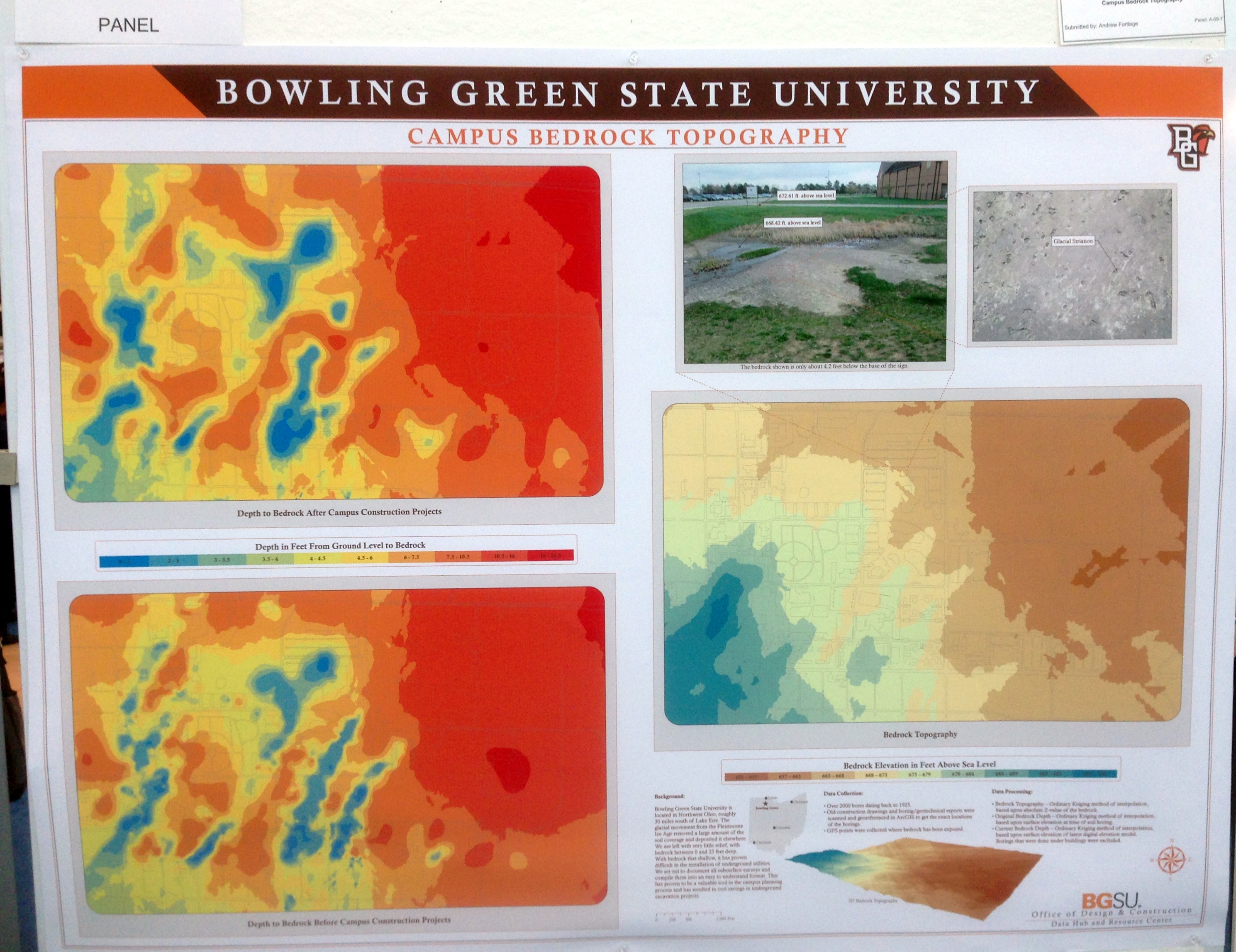
And finally, it was good to see my alma mater making a showing at the Map Gallery exhibition. Go Falcons!
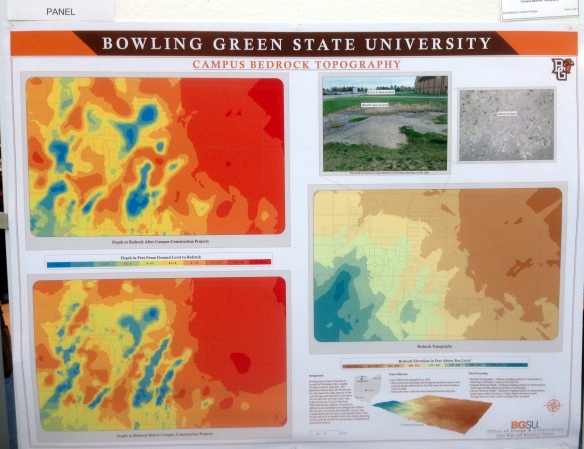
BGSU poster

– Brian


Off To San Diego!

It’s off to San Diego for the annual gathering of the faithful, also known as the 2014 ESRI International User Conference.

Esri-international-user-conference-logo

Looking forward to hear what Uncle Jack has in store for us and picking up mountains of geo-swag from all the exhibitors (I’m bringing along an extra large suitcase just to hold all the cool stuff).

And maybe, just maybe, I’ll be able to find a Trimble rep who is willing to give me a straight answer on why, almost a year on, Trimble still hasn’t released a certified version of Android for their very expensive and potentially very capable, yet unnecessarily crippled, Juno 5 data collectors.

So we’ll see you back here in a week with a report on all the neat stuff I discovered!

– Brian


To The Corps!

I spent most of my military career serving either as a Topographic Officer (21C) or a Terrain Analysis Warrant Officer (215D) in the Army Corps of Engineers. It was clear throughout most of my career that the Engineer branch really didn’t know what to do with us. Longstanding US Army doctrine said that the Corps of Engineers ‘owned’ the topographic and terrain analysis (military geography) discipline, but owning and effectively managing are two different things. The field was so small and specialized that the Engineers tried to manage it by exception, as though we all carried a pox that would infect ‘real’ Engineers if we came too close.

However, this was not always the case. For several decades in the first half of the 19th century two military engineer organizations ran parallel to each other in the US Army. One organization was filled with officers with mostly limited engineering backgrounds. This group was detailed to handle general engineering support to field units, tackling simple engineering tasks like improvements to local fortifications, managing the construction of tracks and trails in support of military movement and doing local reconnaissance and field sketching in support of military operations. These were the regular Engineer forces assigned to the field Army. The other group was filled with the cream of the graduating classes from West Point and some of the top graduates of the few engineering schools operating in the US the time. This group handled most of the civil works improvement projects along the coastlines and interior waterways and mapped the new western territories and opened them for exploration and settlement. This last group truly was the civil engineering force for the new nation and was known as the Corps of Topographical Engineers.


Topographic Engineer Shield

Uniform button design for officers assigned to the Corps of Topographical Engineers.

From roughly 1812 to 1863 the Corps of Topographical Engineers operated as an independent organization, sometimes as a separate branch within the War Department, sometimes as a wholly autonomous section within the Army Engineers.  The ‘Corps’ was little more than a roster of officers detailed to the Topographical Engineer branch.  There were no enlisted personnel assigned and Topographical Engineers were usually dependent on local Army commanders to provide the needed manpower for projects.

What the Corps of Topographical Engineers did have was some of the best civil engineering minds in the nation.  At a time when trained engineering expertise was hard to come by – civil engineering as a defined discipline wouldn’t emerge until well after the Civil War – the Army and Congress often turned to the Corps of Topographical Engineers to handle most of the early public works planning and management. Topographical Engineers explored and mapped the Great Lakes region, managed canal construction and waterways improvements and even surveyed and planned lighthouse locations. In the 1850s, when the federal government needed to have the lands acquired from Mexico and the newly incorporated State of Texas explored and mapped, they sent in the Topographical Engineers. When Congress needed to know if there were suitable routes through the Rocky Mountains for the planned transcontinental railroad they sent the Topographical Engineers to have a look. Once the Oregon Territory dispute was settled with England the Topographical Engineers moved in to map the rugged interiors of what is today Oregon, Washington and Northern California.

Topographical Engineers Orders

Regulation on how officers assigned to the Corps of Topographical Engineers are to be detailed, or appointed, to duties. Excerpted from the ‘Army and Navy Chronicle’, January 2, 1840

In 1863 the Army folded the Corps of Topographical Engineers into the regular Corps of Engineers and a proud organization that provided immeasurable service to the nation disappeared. I guess it was inevitable since there was a desperate need for trained Engineer officers to support the Federal armies during the Civil War, and there was growing overlap in the roles of the two organizations.

The Corps of Engineers’ love affair with it’s mapping and surveying mission waxed and waned over the next 150 years. Engineer officers still found themselves assigned to important topographic missions as America settled it’s western territories, rushed to map its newly acquired territories after the Spanish-American War, threw armies across the seas in World Wars One and Two and stared down the Soviets during the Cold War. I believe the peak of the Corps of Engineers interest in and dedication to its topographic mission came with the establishment of the Army Map Service in WWII. The Engineers realized they had to get damned serious damned fast about this mapping thing and developed the doctrine, equipment, techniques and technology necessary to produce maps and related products to support a world-wide war effort.  This effort continued well into the Cold War, and it was the Army Map Service (and later the Army Topographic Command) that gave us groundbreaking developments such as the Universal Transverse Mercator grid system, the Military Grid Reference System and early research work on an earth-centered geoid that ultimately became WGS 84.

As the Cold War wound down the Corps of Engineers interest in its mapping mission wound down too. As more and more map production was pushed to the national level (to the Defense Mapping Agency, which became the National Imagery and Mapping Agency, which became the National Geospatial-Intelligence Agency) and mapping systems moved from paper to digital and became embedded in battlefield command and control systems, the Engineers seemed on a headlong march to shed their traditional topographic role. Inevitable?  Perhaps.  Wise?  I don’t think so.  Topographic knowledge is the foundation of military expertise. Great generals like Napoleon, Lee and Grant, and Patton all talked about the necessity of being able to visualize the battlefield, the ability to identify ‘good ground’. Someone will always have to paint the battlefield picture for the generals, and that’s the job of the Topographic Engineer.

Although the Corps of Topographical Engineers has faded into history they are not forgotten. There is a small but active group that keeps the history of the early Topographical Engineers alive through research and reenactments. They are the U.S Corps of Topographical Engineers. Their website is a great resource for anyone interested American history and the story of how America grew in the early 19th century.

Topogs

 U.S. Corps of Topographical Engineers historical website

So here’s to the Corps! To a group of dedicated Topographical Engineers that explored, mapped and helped build this great land. Ladies and gentlemen raise your glasses.

To the Corps!

– Brian

A Wonderful Way To Waste A Day

Yesterday on Facebook an old friend, Kurt Schwoppe, provided a link to a new US Geological Survey – ESRI joint project, the USGS Historical Topographic Map Explorer. At first I thought, “Meh, I think I’ve seen this before” and was about to move on, but something told me to click the link.

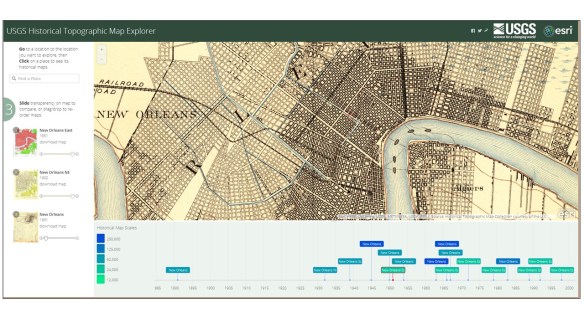
When I came up for air about a half hour later I was entranced. The USGS and ESRI have done a marvelous job of integrating historical map coverage with modern web map technology. The USGS has digitized and georeferenced their entire collection of historical toographic maps covering the entire country (about 178,000 individual maps). The coverage in many areas goes back to the late 1800’s, and users can easily select maps by date and scale, overlay them, adjust visibility to ‘blend’ the views and even download the historical maps directly from the interface.

USGS Historical Map Viewer

By default the website opens focused on New Orleans, as good a place as any to begin exploring the historical maps of a city. Clicking the map links in the timeline in the bottom window will add them to the ‘stack’ on the left side of the web page. From there you can adjust the visibility of each map using a convenient slider to blend the map image in and out, allowing fast and easy comparison with any of the other maps in the stack.

A few initial observations –

First, while there was a steady increase in both the density of content and the variety of information contained in maps as the USGS progressed through the 20th century, there was, sadly, a steady erosion in the practice of cartography as an artistic medium. I understand the USGS’s job isn’t to make art, but visual appeal is something that draws the user to the map. The hand drawn cartography applied to the USGS maps of the late 19th and early 20th century is a wonder to behold. By comparison the current US Topo series maps have all the visual appeal of a rusted out Yugo.

Next, there’s a clear improvement in the spatial accuracy and information content between maps prepared in the late 19th and early 20th centuries and maps prepared in the 1930’s and later. This is due to the adoption of aerial photography and stereo compilation production methods starting in the 1930s. By using stereo aerial photography as a map compilation base the USGS dramatically speeded up map production while simultaneously improving map accuracy and content.

To sum it all up I’ll just say that the USGS Historical Topographic Map Explorer website is the best use of my tax dollars that I’ve seen in a long, long time!

– Brian


ArcGIS Online (Finally!) Gets Labeling

Time for some polite applause.

Yesterday ESRI released an update to ArcGIS Online. This is a significant update because it adds a number of enhancements that the user community has been requesting for quite some time.

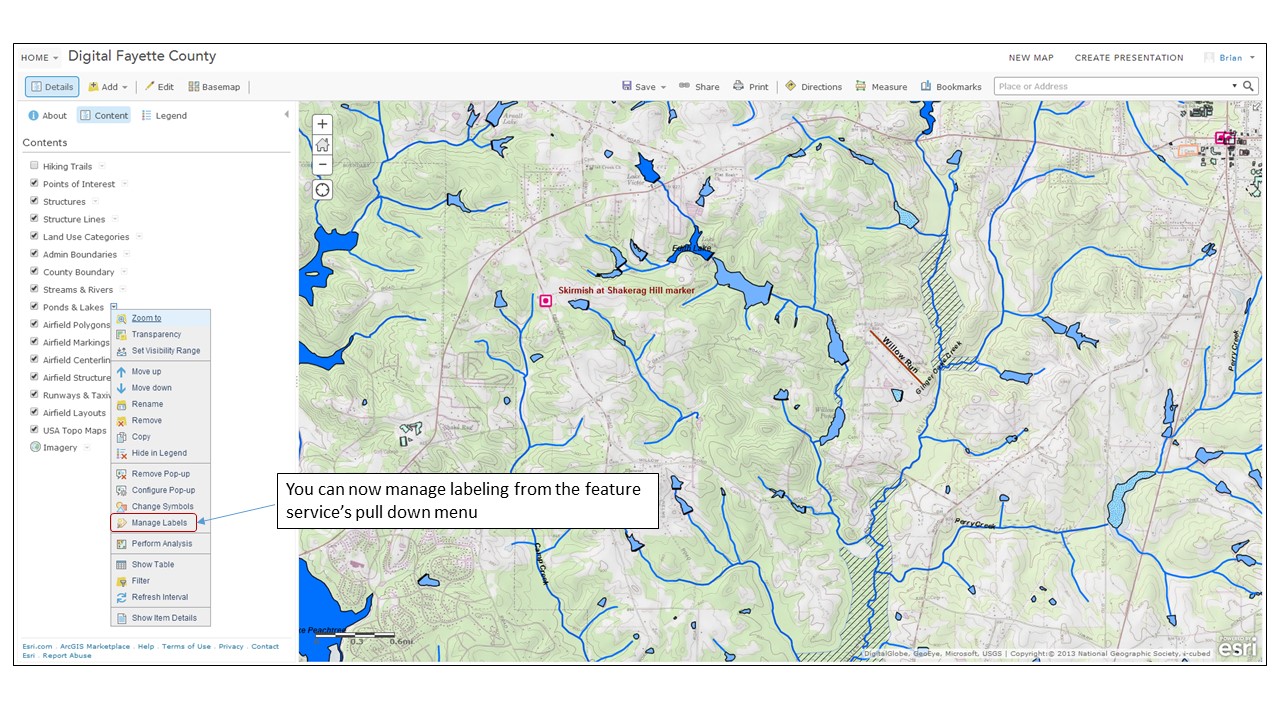
The first enhancement we’ll talk about is labeling. Labeling of hosted feature services has to be the #1 update requested by (paying) customers since ArcGIS Online launched in 2012. A hosted feature service is a type of map service that is stored (or hosted) in ESRI’s ArcGIS Online cloud. Before yesterday the only way to get labels into your ArcGIS Online web maps was to stage your data as a dynamic map service on your own internal servers running ArcGIS for Server or create a cached map (tiled) map service. Both of these options are expensive in cost and overhead. With yesterday’s update you can generate labeling against hosted feature services from within the web map interface.

Digital Fayette County 1

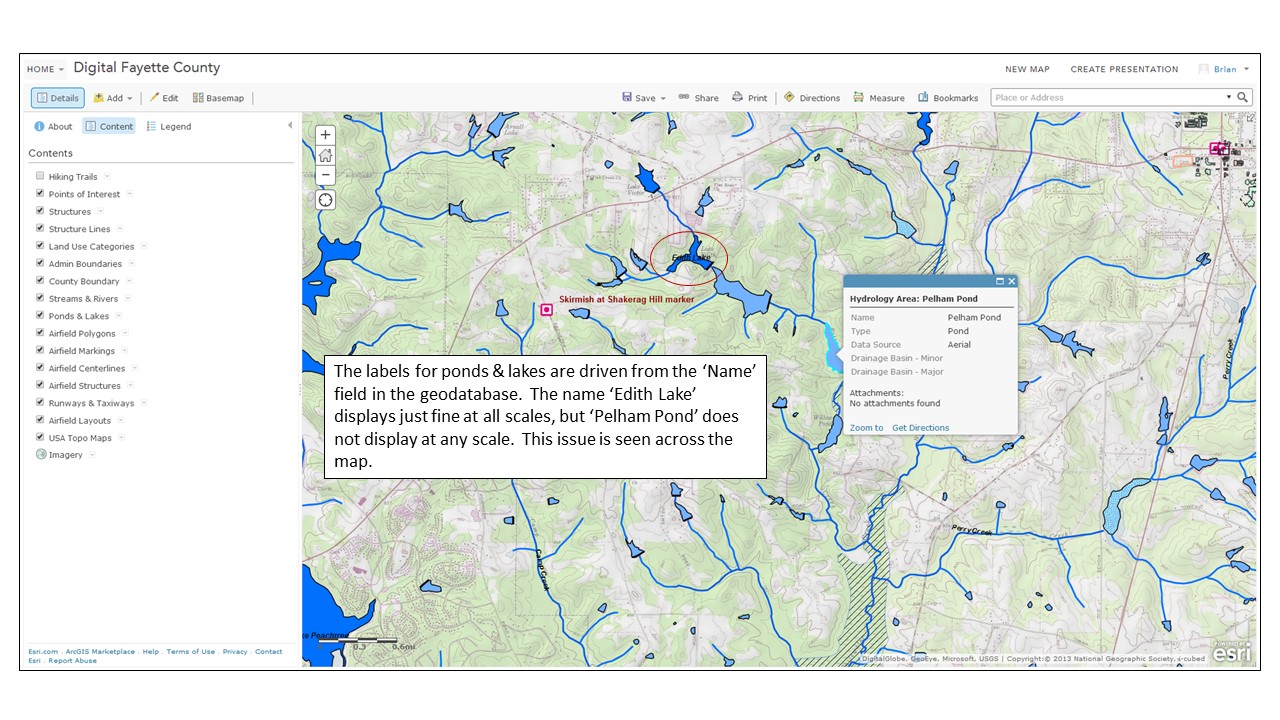
The labeling options are fairly limited. The user gets to choose label placement (above, below or on the line.), which geodatabase field(s) will drive the label name and some basic text formatting options. The line/polyline labeling works well, but there appears to be some major issues with polyogn labels not displaying, even in areas where there are no competing labeling issues.

Digital Fayette County 2

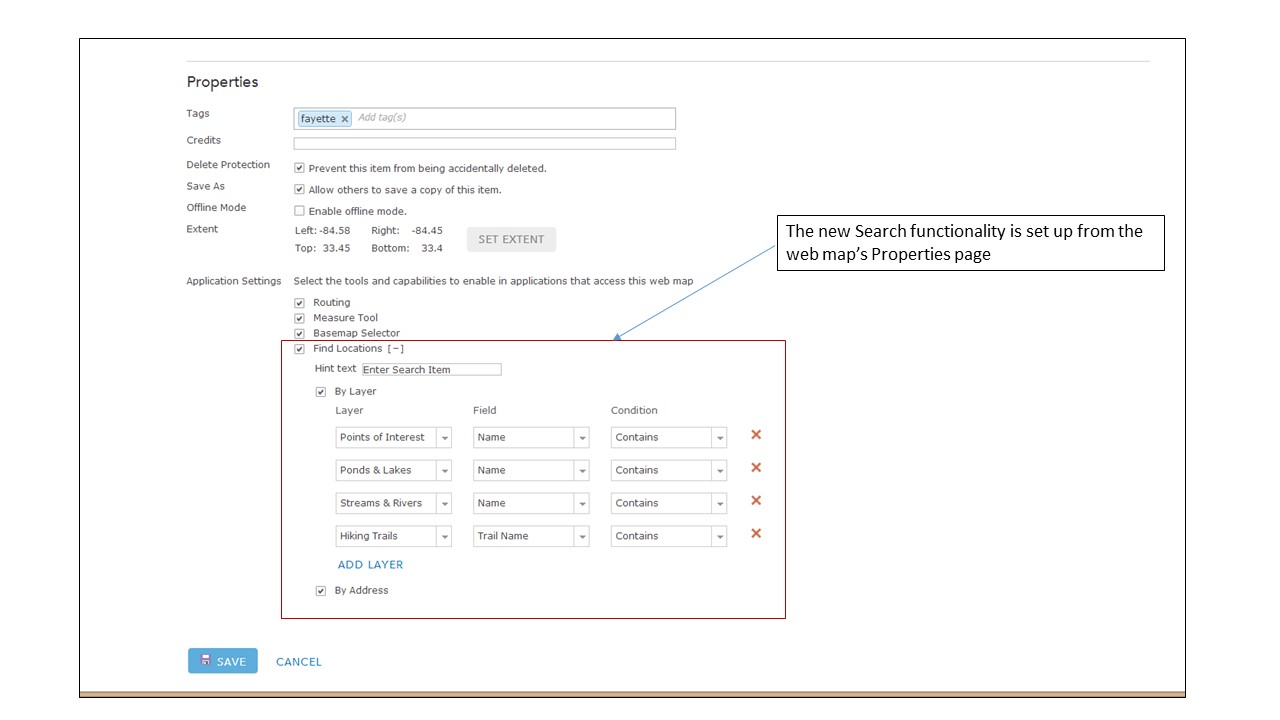
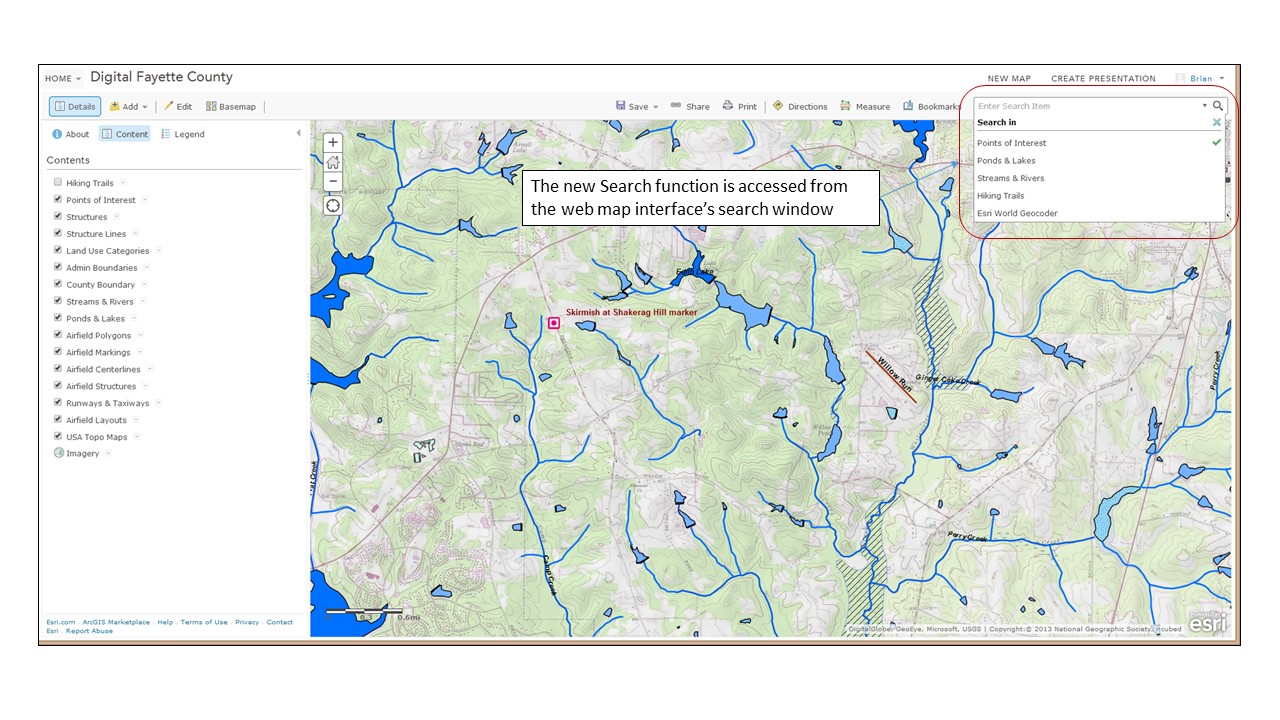
Another critical update is a new search function. ESRI has offered filtering against map layers for some time, and that’s a type of search, but that functionality is intended mainly to generate new focused map layers. For this new search functionality ESRI decided to embed the feature in the web map interface rather than access it from a specific map layer. At first I was a bit confused as to what ESRI was trying to achieve with this new feature – I expected any new search function to be driven from the map interface. However, once I played with it I see ESRI’s logic, and I like how they implemented it.

The search criteria is first set up on the web map’s Properties page.

Digital Fayette County 3

Once the search criteria are set up on the Properties page the user can access the functionality from the web map’s search window.

Digital Fayette County 4

The Search function will zoom to the selected feature and activate associated pop-ups.

Digital Fayette County 5While this is a very simple search functionality it works well and I like how it was implemented.

There are a host of other key updates. I won’t go into detail on them, but new features that have caught my eye include:

  • The ability to display related data in web map pop-ups
  • An update to the Basic Viewer map template that supports searches. The Basic Viewer is one we use heavily in our organization and I’m glad to see this one get a key update
  • The new GeoForm template that allows users to add data to a web map via a web form instead of though a pop-up
  • When exporting data from a web map in file geodatabase format all attachments (pictures, documents, etc.) get exported along with the data

This is just a first and fast look at the new features. There’s a lot of good stuff in here and it’ll take me some time to play with it all. In a few weeks I’ll be out at the annual ESRI International User Conference and I’m sure these new features will get a lot of coverage during the Plenary sessions. Something to look forward to!

– Brian


An Interesting Challenge

I caught this posting the other day on the C4ISR & Networks page:

Geospatial Sensors

This challenge got me thinking. Most of the requirements could easily be met using something like LiDAR – flood the target with enough laser sensors and you could track all the way down to the crickets chirping in the grass, in 4D. But the real challenge in this requirement is for a passive sensor that does not give away the user or sensor location. LiDAR and other systems that could tackle this challenge are all active systems – continuously bathing the target area with active signals in order to collect data. This makes them easy to detect with fairly rudimentary electromagnetic spectrum receivers (i.e., radios tuned to the right frequency).

So I started thinking. How could this problem be tackled with a passive collector system? For an old topographer like me the answer is simple – photogrammetric technology!  A pair of video cameras that collect high resolution imagery in a variety of spectrums (visible and passive IR) and have modern night vision capability could easily collect real time stereo still imagery (3D) and video (4D). They’d have to sit along a calibrated baseline, but that’s easy to establish using military grade GPS. All of this technology could be easily squeezed into fairly small, man-portable units. The data would have to be uploaded to computers for post-processing and visual display, and for real or near-real time use that implies some sort of a communications link. But still, the data collection part seems to me to be a simple application of available technology.

Hmm… maybe it’s time I hang out my shingle as a defense industry consultant!

– Brian


Keep Your BFFs Off The FSMs

That would be, keep your big fat fingers off the first surface mirrors.

I buy a fair number of old optical instruments related to topography, surveying and navigation for my collection. Everything from Brunton pocket transits to theodolites to sextants. The majority of these instruments rely on first surface mirrors to establish a precise optical path. A first surface mirror, or front surface mirror, is a mirror where the reflective coating (silvering) is applied on top of the glass instead of behind the glass as on standard surface mirrors.

firstsurfacemirror

First surface mirrors provide a clearer and more precise light path vs. standard surface mirrors, and eliminate the ‘ghosting’ issue seen when using standard mirrors

When I was going through the Defense Mapping School for various courses in the 1980s I got training on systems like the Analytical Photogrammetric Positioning System (APPS). The APPS consisted of a large stereosope connected to an X-Y controller and an early desktop computer. The APPS used large first surface mirrors to provide a highly precise view of specially processed film positive stereo images. The georeferenced images allowed the operator to determine the precise location (x, y & z) of features in the images – road intersections, bridges, buildings, runways, etc. In its time the APPS was a revolutionary system, and it relied on first surface mirrors to bring the stereo images to the operators eyes.

APPS

 The APPS in use

Whatever we were being trained on, whether it was the APPS, or reflecting stereoscopes, or any instrument that used first surface mirrors the instructors warned us repeatedly – “keep your big fat fingers away from the first surface mirrors!” And for good reason. Because the reflective coating is placed on top of the glass the reflective surface is unprotected and exposed to the elements. The oil and sweat in the human hand contains acids that can permanently etch these exposed reflective surfaces. Even things like the tar and nicotine from cigarette smoke, the oil mist from small pumps and motors, and a whole host of other environmental pollutants will attack the reflective surface of these mirrors. Their only defense is the care exercised by the user.

Whenever I check out at an instrument like a stereoscope to add to my collection the first thing I look at is the mirrors. The condition of the mirrors is a direct indication of the care the instrument has received and the conditions it was stored under. Dirty and/or tarnished mirrors usually indicate the instrument was not well cared for or stored properly. If the mirrors are in bad shape it’s a good bet that the other components, like the optics, are in bad shape too. Bad mirrors = a significantly lower offering price. The reason is simple – first surface mirrors are hard to get and expensive. A new set of primary mirrors for a stereoscope can easily exceed $100. If someone is asking a couple of hundred dollars for a stereoscope you don’t want to be putting another hundred bucks or so into a new set of mirrors.

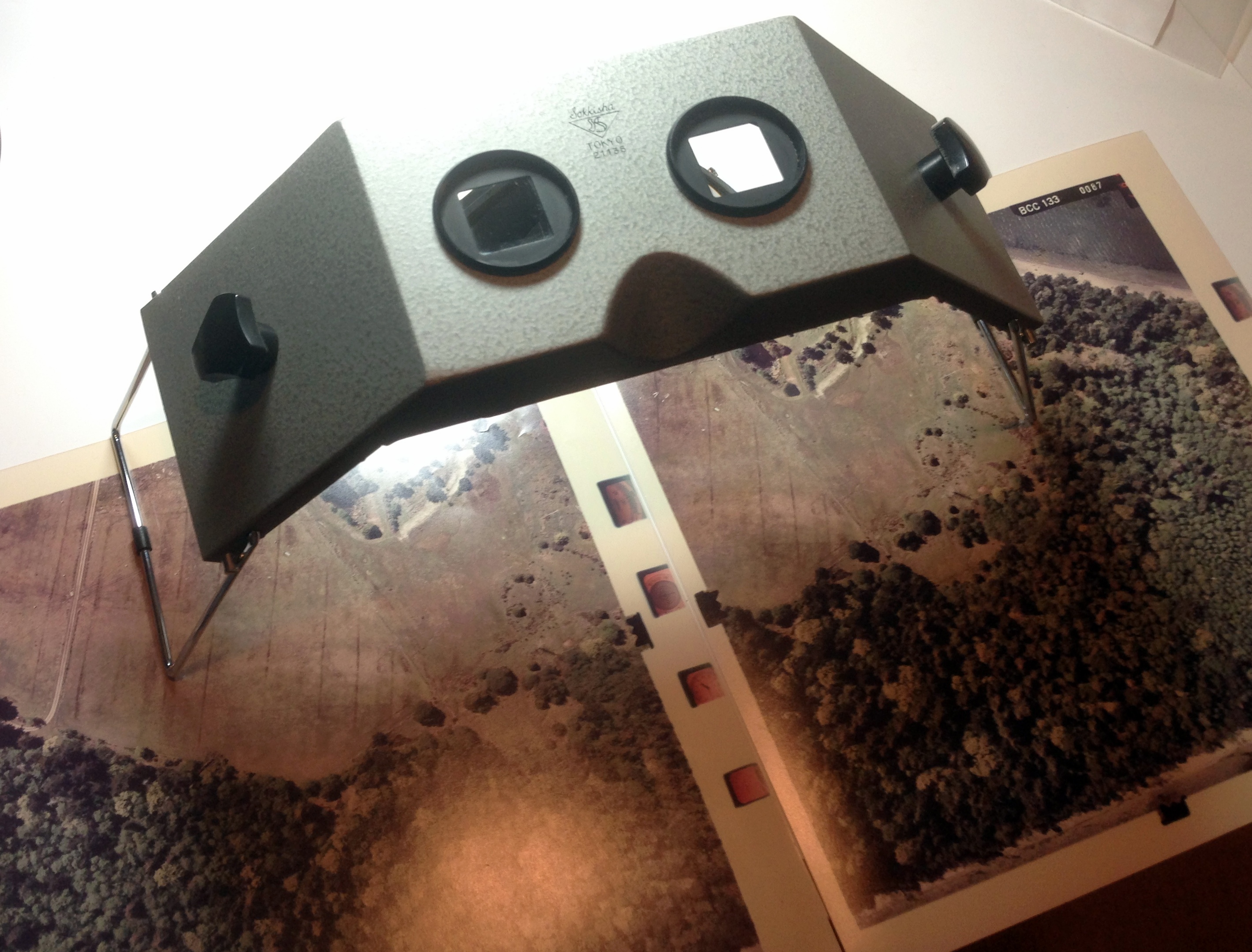
But sometimes the asking price is so good that you take a chance, and that’s what I did with the stereoscope we’ll take a look at today. Several months back I spotted a nice little Sokkisha MS-16 stereoscope for sale on eBay.

Sokkisha-1

The seller did a good job of photographing the stereoscope from a number of perspectives, including a clear shot of the primary mirrors. Overall the instrument looked like it was in very good condition. I tossed out a low bid and was surprised when I won. When the stereoscope arrived I gave it a quick inspection and was pleased to see it really was in good condition, including the primary mirrors.

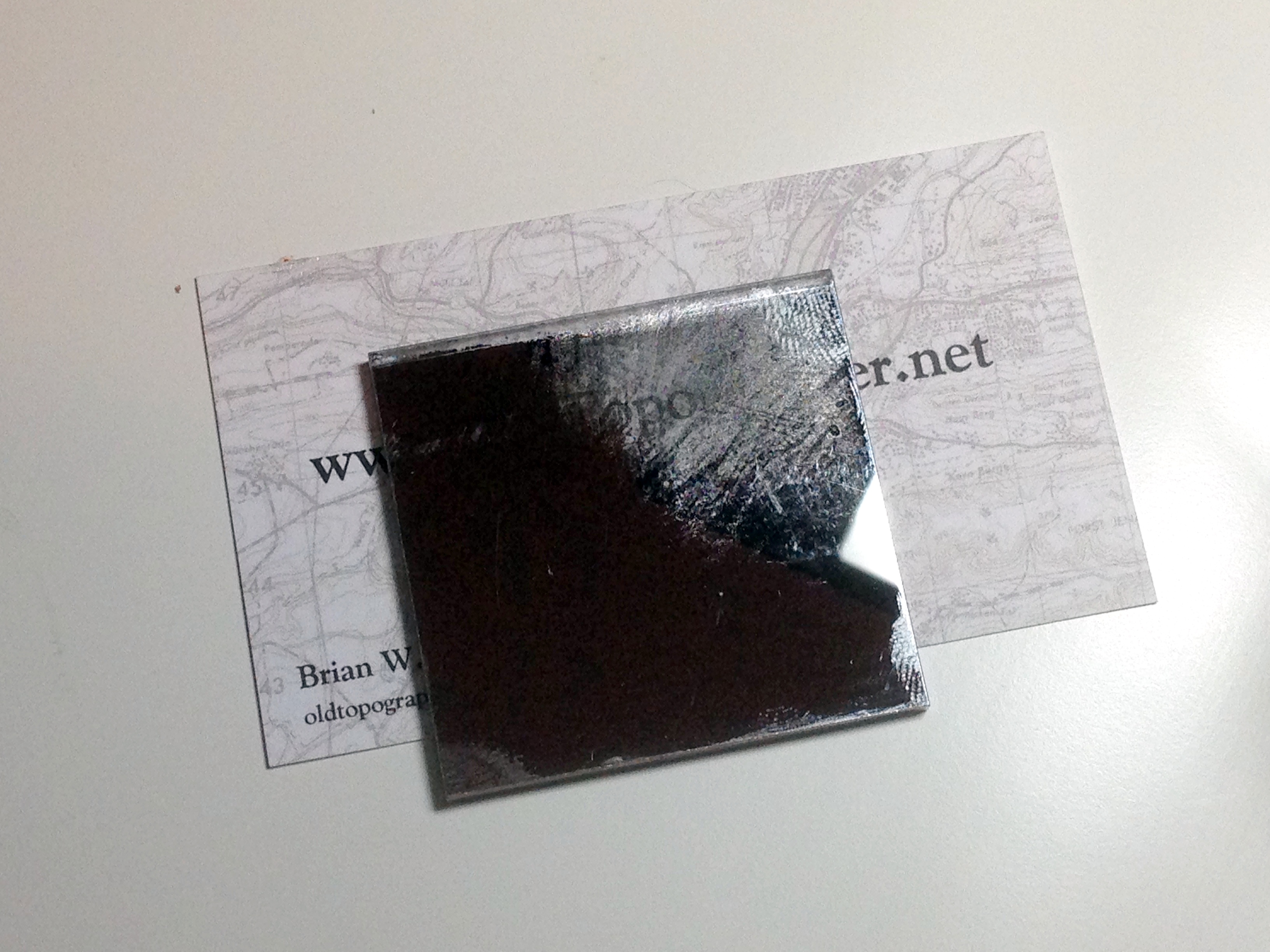
I slid a set of stereo images underneath for a check of the optics and immediately noted that the right side was a little cloudy. At first I suspected a dirty lens, but further investigation revealed that one of the small secondary mirrors was ‘dirty’. A gentile swipe with some alcohol didn’t improve the situation so I removed the lens bridge for a closer look. I was disappointed to see that the right mirror wasn’t dirty, it was badly scratched. So bad, in fact, that much of the reflective coating had been scraped off of the glass backing. Because of the compact design of this stereoscope it’s difficult to imagine how this mirror got damaged. Somebody had to stick a finger up into a place that’s hard to reach and rub, rub, rub.

Sokkisha-3

Note the ‘smudge’ seen in the right eyepiece – that’s actually the coating scraped off of the secondary mirror

In any other situation I would have contacted the seller and shipped the instrument back for a refund. However, this stereoscope was in overall great shape and the only issue was this one small mirror. Since I didn’t have a whole lot of money invested in it I figured I’d have some replacement mirrors made.

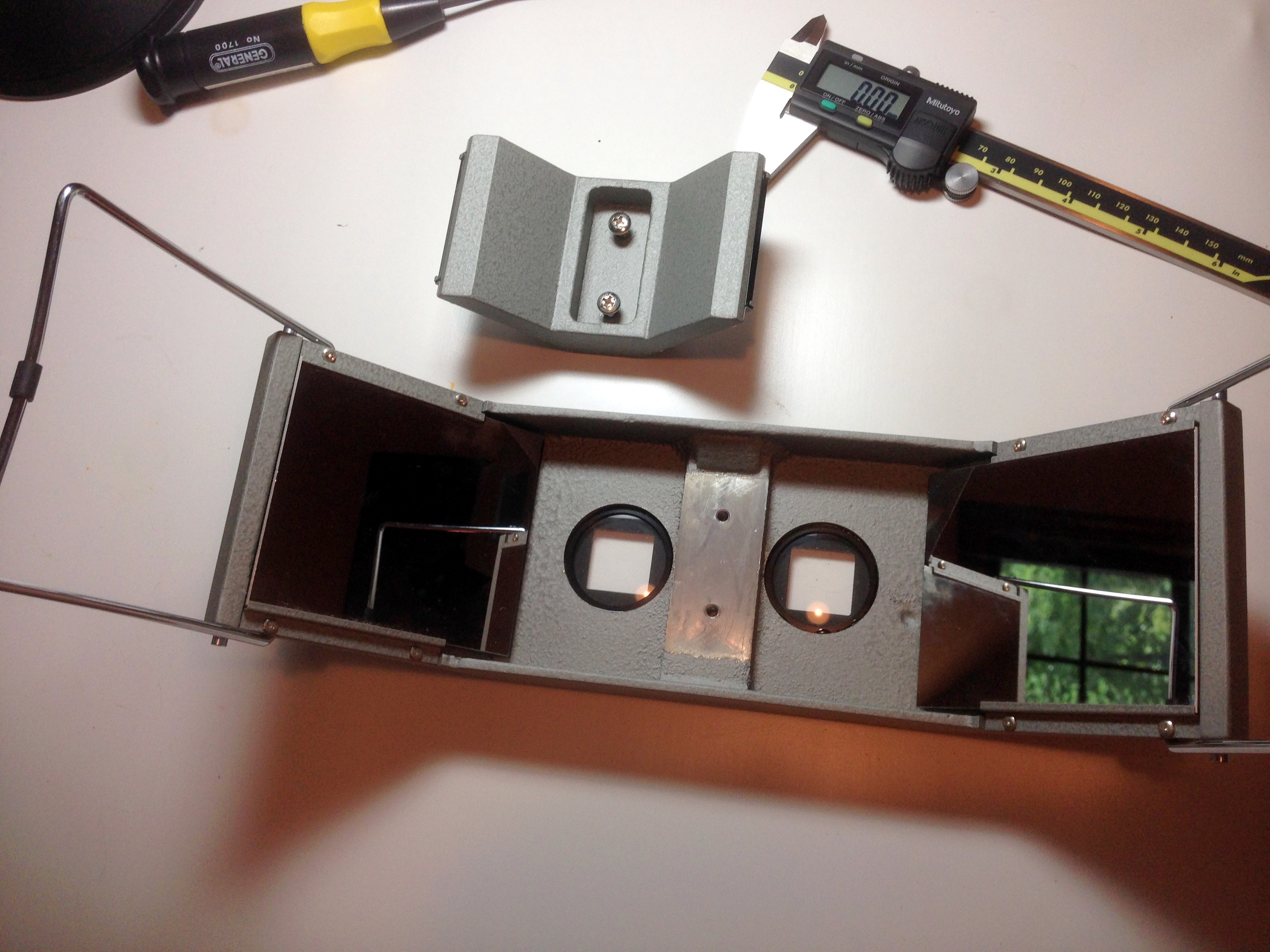
The first thing to do was to get the damaged mirror out and measure it. With a stereoscope of this design it’s an easy job:

Sokkisha-5

Just remove the two screws holding the mirror bridge in place…

Sokkisha-6

And off it comes

Sokkisha-7

A quick shot of the mirror while still mounted on the bridge shows the damage (that’s my iPhone seen in the reflection)

Sokkisha-9

With the mirror out of the bridge we can clearly see the extent of the damage. Somebody went at the mirror with something abrasive!

Careful measurement of the mirror showed that it’s 46 mm wide x 48 mm long and 3 mm thick. Next it was off to FirstSurfaceMirror.com, an on-line vendor of custom sized glass and acrylic backed first surface mirrors. A single replacement mirror would have cost me $20, but I decided to replace the pair. Buy two mirrors of the same size on the same order and you get a 15% discount on the second mirror. Two mirrors for a total of $36. Not bad.


Within a week of placing the order the new mirrors were sitting in my mail box. A quick check of the dimensions shows that FirstSurfaceMirror.com did a good job with the width and length, but the thickness was just a bit off – 3.2mm (1/8″) vs. the requested 3mm, but considering they are using standard US glass it is a discrepancy I can live with as long as the new glass goes into place properly.

Sokkisha10

The new mirrors from FirstSurfaceMirror.com came carefully wrapped in bubble packing and individually sealed in polyvinyl pouches

Sokkisha-11

Time to gather up all the bits ‘n pieces and get this thing back together

Sokkisha-12

The new mirror mounted in place just fine. The added thickness didn’t cause any issues. While I had the mirror bridge off I decided to clean all the mirrors. I like the Zeiss lens cleaning wipes sold at retailers like Wal-Mart. Inexpensive and they do a good job

So with the mirrors and lenses all cleaned up and everything put back together it was time for a quick check for image clarity. I was thrilled to see that this neat little instrument delivers outstanding optical performance. The stereo image was crisp edge-to-edge. It’s amazing the detail that can be gleaned from a high resolution stereo image set and a well adjusted stereoscope with clean mirrors and lenses – the features quite literally jump right out at you. This little stereoscope delivers, and now it’s ready for another few decades of use!

Sokkisha-13A couple of observations on collecting, cleaning and maintaining optical instruments like stereoscopes:

  • Mirrors do go bad with age, particularly those used in WWII-era instruments. The silvering begins to tarnish or fungus gets a foothold on the glass surface and begins to etch the surface as it grows. Even mirrors stored under ideal conditions will show the effects of simple aging. More modern (post-war) stereoscopes generally use mirrors that have a more durable aluminum reflective coating and seem to be less prone to tarnishing and other damage.
  • Generally speaking, unless the instrument has significant historical or other collector value (rarity) most optical instruments are not worth the investment to get them restored to full working condition. Take the Fairchild F-71 stereoscope I have in my collection as an example. It is a very common type of instrument that was manufactured by the thousands between 1942 and the 1960’s. Most F-71 stereoscopes offered for sale have seen long, hard use and have condition issues, mainly tarnished or damaged mirrors and dirty optics. If you are looking for a good working mirror stereoscope I recommend purchasing a more recent production model from one of the Japanese manufacturers. They offer excellent quality at fairly reasonable auction prices.
  • Repair or cleaning of the interior of optical systems like the binocular heads found on many mirror stereoscopes is difficult and requires special tools. Disassembly and reassembly can be done, with some care, but re-collimating a set of binocular optics is extremely difficult without specific test equipment.
  • Make sure you use the right cleaning materials and techniques. The old standbys, denatured alcohol, 100% cotton lint free cloths and a lens cleaning brush, are all you’ll need to do the job right. The new alcohol-free lens cleaning solutions sold in optical departments at places like Wal-Mart also work very well. Don’t use ammonia based cleaners like Windex. Start the cleaning process by gently wiping away loose dust using the lens cleaning brush. Then moisten a cloth with cleaning solution and using a light, gentle touch wipe down only those areas of the mirror that need cleaning (fingerprints, smudges, etc.). There’s usually no need to clean the entire mirror surface, just clean those areas that need it. Remember, less is best. Over-aggressive cleaning has ruined more optical instruments than neglect ever did.
  • A set of properly fitting screwdrivers is important. One of the other things I check when evaluating instruments are the screw heads. I look for screw heads that show evidence of having been tampered with. If a screw head looks buggered up – a slotted screw head that’s been torn up or widened, or a phillips head that’s been rounded out by a poorly fitting screwdriver tip, all indicates that bubba’s been doing some repair/adjustment work on the item and more than likely messed something up.
  • Make sure your work area is clean and well lit. Don’t do this kind of work on the same workbench you repair lawnmower engines on.
  • And remember – keep your big, fat, greasy, sweaty fingertips off of the mirrors and optics! During the work on this stereoscope I wore latex gloves and immediately cleaned off any inadvertent marks or smudges using cleaners designed specifically for cleaning optics.

So what’s next? Just for fun I may try my hand at cleaning up my Fairchild F-71 using (cheaper) acrylic-backed mirrors instead of glass. Stay tuned!

– Brian